If the Dyson V7 has a blinking blue light, it simply means that the vacuum needs to be charged. This can happen when the battery is empty or when there is a temporary fault such as extreme temperature.
To fix this issue, the user should charge the vacuum and ensure that there are no blockages in the power cable or other parts of the device. Dyson V7 is a popular handheld stick vacuum that is known for its powerful suction and versatility.
However, users may sometimes encounter an issue where the vacuum's blue light starts blinking. This can be confusing and may raise concerns about the vacuum's functionality. We will discuss why the Dyson V7 blue light blinks and how to fix it. By following the troubleshooting tips provided, users can quickly resolve this issue and get their vacuum working properly again.
The Dyson V7 on its charging dock showing the battery status indicator
Credit: www.dyson.com
Introduction To Dyson V7 Blinking Blue Light
If you own a Dyson V7 vacuum cleaner and have noticed a blinking blue light, you might be wondering what it means and what steps you should take. In this article, we will explore the meaning behind the Dyson V7 blinking blue light and provide you with some common issues and their solutions. By the end, you'll have a clear understanding of what to do when faced with this situation.
What Does The Blinking Blue Light Indicate?
When you see a blue light blinking on your Dyson V7, it simply means that the vacuum needs charging. To resolve this issue, you should plug your Dyson V7 into the charger and ensure it gets enough time to fully charge. Once the battery is fully charged, the blue light should stop flashing and your vacuum will be ready for use again.
In practice, many users expect the blue light to turn solid immediately upon plugging in, but a brief period of blinking during the first few minutes of charging is normal. If the light continues blinking for longer than 10 minutes without becoming steady, something else may be interfering.
Common Issues And Solutions
Despite the straightforward nature of the blinking blue light, there are a few common issues that might arise. Here are some possible scenarios and their corresponding solutions:
Issue: Battery not charging
If the battery of your Dyson V7 is not charging, there could be an issue with the charging cable. You can try the following solutions:
Check if the charging cable is securely plugged into both the vacuum cleaner and the power outlet.
Ensure that the charging cable is not damaged or frayed. If it is, you may need to replace it.
Try using a different power outlet to rule out any issues with the current one.
A common mistake is overlooking the charging contacts on the vacuum itself. These small metal pins can accumulate dust and grime over time, preventing a proper connection. Gently wiping them with a dry cloth or a cotton swab dipped in isopropyl alcohol often restores normal charging behavior.
Issue: Temporary fault or power failure
If you see an amber light flashing along with the blue light, it indicates a temporary fault or power failure. Here's what you can do:
Allow the vacuum to cool down or warm up to room temperature, depending on the situation.
If the issue persists, contact the Dyson Helpline for further assistance.
Temporary faults are more common than owners expect. The V7's battery management system is sensitive to voltage irregularities, which can occur if the vacuum is used immediately after being stored in a hot car or a cold garage. Waiting 30 to 60 minutes for the battery to reach a normal operating range (roughly 5°C to 40°C) before charging again is the most reliable fix.
Issue: Fault in the vacuum
If a red light is flashing, it means there is a fault in your Dyson V7. In this case, you should reach out to the Dyson Helpline and provide them with the necessary details. They will guide you on the next steps to take in order to resolve the issue and get your vacuum working again.
By understanding what the blinking blue light on your Dyson V7 indicates and being aware of some common issues and their solutions, you can effectively troubleshoot and resolve any problems that might arise. Keep these tips in mind the next time you encounter a blinking blue light and get your vacuum cleaner back in working order quickly and easily.

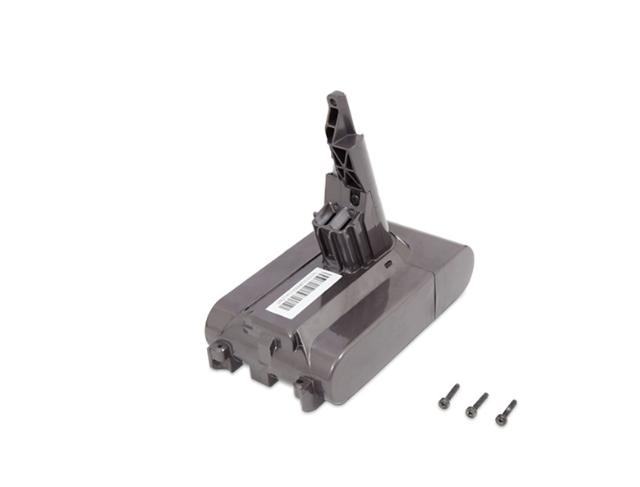
Removing the V7 battery pack to check the charging contacts and connection
Credit: m.youtube.com
Troubleshooting Steps For Dyson V7 Blinking Blue Light
If you're experiencing a blinking blue light on your Dyson V7 vacuum, there are a few troubleshooting steps you can take to address the issue. In this guide, we will walk you through each step to identify and resolve the problem.
Checking The Battery And Charging Cable
The first thing to check is the battery and charging cable. Ensure that the vacuum is properly connected to the charger and that the charging cable is securely plugged into an outlet. If the battery is low, the blue light will blink to indicate that it needs charging. Let the vacuum charge fully and then try using it again.
Inspecting For Blockages
If the battery is fully charged and the blue light continues to blink, there may be a blockage in the vacuum. Start by inspecting the power head and base unit for any obstructions. Hair, debris, or other objects can get stuck in the vacuum and prevent it from operating properly. Remove any blockages you find and try using the vacuum again.
Cleaning The Filter
Another potential cause of the blinking blue light is a clogged filter. Over time, dust and dirt can build up in the filter, restricting airflow and causing the vacuum to malfunction. Remove the filter from the vacuum and rinse it under cold water until the water runs clear. Allow it to dry completely before reinstalling it in the vacuum.
A full 24-hour drying time is recommended — not just a few hours. A damp filter can trigger false overload protection and cause the blue light to blink even with a fully charged battery, a scenario that frequently leads owners to mistakenly order replacement parts.
Proper Storage And Maintenance
Improper storage and maintenance can also contribute to the blinking blue light issue. Ensure that the vacuum is stored in a location with a suitable temperature range (as specified in the user manual) to prevent any battery-related issues. Regularly clean and maintain the vacuum according to the manufacturer's instructions to keep it in optimal working condition.
Storing the V7 on its charging dock continuously for weeks or months can accelerate battery degradation. For long-term storage, Dyson recommends removing the battery from the vacuum and storing it in a cool, dry place at around 50% charge — a routine step many owners overlook until they encounter persistent blink issues.
Replacing The Battery
If none of the above steps resolve the blinking blue light issue, it may be time to consider replacing the battery. Over time, batteries can wear out and lose their ability to hold a charge. Contact Dyson customer support or refer to the user manual for guidance on how to safely replace the battery.
Understanding The Dyson V7 Charging Indicators
If you see the Dyson V7 blinking blue light, it means that the vacuum needs to be charged. Make sure to inspect the power cable and clean the vacuum thoroughly if the issue persists. Avoiding a dead battery or any obstructions can help resolve the problem.
Meaning Of Different Charging Lights
The Dyson V7 vacuum cleaner comes with several charging indicators that can help you understand the status of your device. These lights serve as helpful visual cues, allowing you to quickly identify any issues that may be preventing your vacuum from working properly. By understanding the meaning behind each charging light, you can troubleshoot any problems effectively.
Interpreting The Flashing Blue Light
One of the most common charging indicators on the Dyson V7 is the flashing blue light. If you see the blue light blinking, it simply means that your vacuum needs charging. This is a normal sign, indicating that the battery is running low on power and needs to be recharged. Simply connect your vacuum to the charging dock or plug it directly into a power source using the charging cable to replenish the battery.
Ensuring The Charging Light Adheres To Html Syntax – Example
Meaning of different charging lights: The Dyson V7 vacuum cleaner comes with several charging indicators that can help you understand the status of your device. These lights serve as helpful visual cues, allowing you to quickly identify any issues that may be preventing your vacuum from working properly. By understanding the meaning behind each charging light, you can troubleshoot any problems effectively. Interpreting the flashing blue light: One of the most common charging indicators on the Dyson V7 is the flashing blue light. If you see the blue light blinking, it simply means that your vacuum needs charging. This is a normal sign, indicating that the battery is running low on power and needs to be recharged. Simply connect your vacuum to the charging dock or plug it directly into a power source using the charging cable to replenish the battery.
Additional Resources And Support
If you're experiencing a blinking blue light on your Dyson V7, it simply means the vacuum needs to be charged. To fix this issue, make sure to inspect the power cable and ensure that the battery is properly charging. If the problem persists, contact the Dyson Helpline for further assistance.
Exploring Online Videos For Troubleshooting
If you're experiencing a blinking blue light on your Dyson V7, exploring online videos can be a great way to troubleshoot the issue. Many YouTube channels and websites offer step-by-step guides and tutorials on how to fix common problems with Dyson vacuums. By watching these videos, you can gain valuable insights and solutions to resolve the blinking blue light issue.
Contacting Dyson Customer Support
If you're unable to find a solution through online resources, the next step is to contact Dyson customer support. They have a dedicated team of experts who can provide personalized assistance and guide you through the troubleshooting process. Simply reach out to Dyson's customer support through their website or call their helpline to discuss your specific issue and get the necessary support to resolve the blinking blue light problem.
Utilizing Forums And Communities For Assistance
Another excellent resource for finding support is through online forums and communities. There are several Dyson-specific forums and communities where users share their experiences, ask questions, and provide helpful advice. By joining these communities, you can connect with other Dyson vacuum owners who may have faced the same blinking blue light issue and successfully resolved it. Utilize these forums and communities to ask questions, seek guidance, and learn from the experiences of others.
Preventing Dyson V7 Blinking Blue Light Issues
If you own a Dyson V7 handheld stick vacuum, you may have experienced the frustrating issue of the blinking blue light. This blinking light indicates that the vacuum needs charging, but sometimes it can occur even when the battery is fully charged. To prevent this issue from happening and ensure smooth operation of your Dyson V7, there are a few best practices and regular maintenance routines that you should follow.
Best Practices For Proper Usage
Always fully charge your Dyson V7 before using it for the first time. This will help optimize battery life and prevent premature blinking blue light issues.
Avoid completely draining the battery before recharging. It is recommended to recharge the vacuum as soon as you notice a decrease in performance or when the battery indicator shows one or two bars remaining.
Store your Dyson V7 in a cool and dry place when not in use. Extreme temperatures can affect the battery performance and cause blinking blue light issues.
Regular Maintenance Routine
Maintaining your Dyson V7 on a regular basis can help prevent the blinking blue light issue. Here are some maintenance tasks you should perform:
Clean the filter regularly to ensure proper airflow. Refer to the user manual for instructions on how to remove and clean the filter.
Check for any blockages in the wand, brushbar, and bin inlet. Remove any debris or tangled hair that may affect the vacuum's performance.
Empty the bin after each use to prevent it from getting clogged. A clogged bin can lead to decreased suction power and potential blinking blue light issues.
Inspect the power cable for any damage or frayed wires. If you notice any issues, it is important to replace the cable to avoid electrical problems.
Following these regular maintenance tasks and best practices for proper usage can help ensure that your Dyson V7 operates smoothly, without any blinking blue light issues. By taking care of your vacuum, you can enjoy efficient cleaning performance and extend the lifespan of your Dyson V7.
Frequently Asked Questions Of Dyson V7 Blinking Blue Light
What Does Blue Flashing Light Mean On Dyson V7?
A blue flashing light on the Dyson V7 indicates that the vacuum needs to be charged.
Why Is My Dyson Not Working And Flashing Blue?
A flashing blue light on your Dyson indicates that it needs to be charged. Check the battery and make sure it is properly connected. If the issue persists, contact Dyson support.
How Do I Know If My Dyson V7 Battery Is Bad?
If your Dyson V7 battery is bad, it will show a flashing blue light. This indicates that the battery needs charging. Make sure to check if there are any blockages in the vacuum and clean it thoroughly. If the issue persists, contact Dyson Helpline for assistance.
What Does Flashing Lights On Dyson Mean?
Flashing lights on Dyson mean that the vacuum needs charging or there is a temporary fault. Blue light indicates low battery, amber light indicates no power or a temporary fault, and red light indicates a fault. Inspect the power cable and clean the filter to resolve any issues.
Why Is My Dyson V7 Vacuum Flashing A Blue Light?
The flashing blue light indicates that your vacuum needs to be charged. Simply plug it in to recharge the battery.
Dyson V7 Blue Light Patterns: A Quick Reference
A simple comparison can help you identify the exact issue at a glance. Here is a breakdown of each light pattern you might see and what it means for your V7:
| Light Pattern | Meaning | What To Do |
|---|---|---|
| Solid blue (charging) | Battery is actively charging | Leave it connected; light turns off when full |
| Blinking blue (slow, ~1 blink per second) | Battery is low and needs charging | Plug into charger; check contacts if it persists past 10 minutes |
| Blinking blue (fast, ~3 blinks per second) | Temporary fault — too hot or too cold | Let vacuum sit at room temperature for 30–60 minutes, then retry |
| Amber light flashing | No power or temporary fault | Check power outlet and cable; allow temperature stabilization |
| Red light flashing | Fault in the vacuum hardware | Contact Dyson Helpline for service guidance |
When To Seek Professional Repair
While most blinking blue light issues resolve with the steps above, certain signs indicate that a repair or replacement is necessary rather than a simple fix. If you notice any of the following, professional service is the safest course:
- Physical swelling or bulging of the battery pack — this is a safety concern and requires immediate replacement.
- Burning smell near the charging port or battery — unplug the vacuum and stop using it.
- The vacuum runs for only a few seconds after a full charge cycle (2+ hours), then returns to blinking blue. This often means the battery cells have degraded beyond recovery.
- The blinking blue light does not respond to any of the troubleshooting steps listed above after trying each one in sequence.
For these cases, you can locate your nearest Dyson authorized service center through the Dyson support portal. If your vacuum is within warranty, any battery or motor fault should be covered at no cost.
Conclusion
If your Dyson V7 has a blinking blue light, it simply means that the vacuum needs to be charged. This is a common issue that can be easily resolved by ensuring the device is properly charged. If you are experiencing other problems, such as a flashing amber or red light, it may indicate a power or fault issue.
In these cases, it is recommended to contact Dyson Helpline for assistance. Remember to regularly check and clean your Dyson vacuum to prevent any blockages.