Welcome to the world of troubleshooting your Lennox furnace! A cozy home is essential for comfort, especially during chilly weather. However, when your furnace starts blinking that ominous red light, it can quickly turn into a chilly predicament. But fear not! Understanding what that blinking light signifies and how to troubleshoot it can save the day, ensuring your home stays warm and toasty.
In this comprehensive guide, we'll walk you through the intricacies of that red blinking light on your Lennox furnace, offering troubleshooting tips and expert advice to get your furnace back in tip-top shape.
Understanding The Red Blinking Light On A Lennox Furnace
If you've noticed a red blinking light on your Lennox furnace, it's important to understand what it indicates and the possible causes behind it. The red blinking light is a diagnostic tool that can help you identify potential issues with your furnace. In this section, we will explore what the red blinking light signifies and what might be causing it.
What Does The Red Blinking Light Indicate?
The red blinking light on a Lennox furnace is a signal that there is an issue within the combustion assembly area. It could be due to fuel error, ignition malfunction, or flame-proving failure. One common cause is a dirty flame sensor. The flame sensor is responsible for detecting the presence of a flame to ensure safe and efficient operation of the furnace. If it becomes dirty or covered in residue, it can't properly detect the flame, leading to the red blinking light.
In practice, the blink pattern itself can tell you more. Most Lennox furnaces use a diagnostic LED that blinks a specific number of times, then pauses and repeats. For example, one blink might indicate a flame-sense fault, while three blinks could point to a pressure-switch issue. Check the inside of your furnace access panel—many models have a printed code chart right there. If not, your owner's manual will list the exact blink counts for your model year.
Possible Causes Of The Blinking Red Light
Several factors can contribute to the red blinking light on a Lennox furnace. Here are some possible causes:
Dirty Flame Sensor: As mentioned earlier, a dirty flame sensor can cause the red blinking light. This can happen over time as the sensor accumulates dirt, dust, or other contaminants.
Ignition Issues: Problems with the ignition system, such as a faulty igniter or gas valve, can trigger the red blinking light. These issues can prevent the furnace from igniting properly, leading to the diagnostic signal.
Blocked Vent: A blocked vent or exhaust pipe can cause issues with combustion, resulting in the red blinking light. Obstructions like debris, bird nests, or ice can hinder the flow of exhaust gases, affecting the furnace's operation.
Thermostat Problems: Faulty or misconfigured thermostats can also trigger the red blinking light. Incorrect temperature settings or wiring issues can disrupt the communication between the thermostat and the furnace, causing the diagnostic signal to activate.
Limits Switch Tripped: The limit switch on the furnace monitors the system's temperature. If it detects excessive heat, it will shut off power to prevent damage. Factors like clogged filters or airflow restrictions can cause the limit switch to trip, resulting in the red blinking light.
If you notice a red blinking light on your Lennox furnace, it's recommended to address the issue promptly. Checking and cleaning the flame sensor, inspecting for blockages, and ensuring proper thermostat functionality are some initial troubleshooting steps you can take. However, if you're uncertain or unable to identify the cause of the red blinking light, it's best to contact a qualified HVAC professional for assistance.
Decoding Lennox Furnace Blink Patterns
Beyond a general red light, the specific blink sequence can save you time. On most Lennox models manufactured after 2010, the LED will flash a certain number of times, pause for two to three seconds, then repeat. Count the blinks carefully. A common pattern on the Lennox Merit and Elite series is:
- 1 blink – Flame sense failure (clean or replace the flame sensor)
- 2 blinks – Limit switch open (check for restricted airflow or a dirty filter)
- 3 blinks – Pressure switch stuck open or closed (inspect the vent pipe for blockages)
- 4 blinks – High limit switch tripped (check your air filter and blower motor)
If the light stays solid red rather than blinking, the furnace may simply be powered on but waiting for a call from the thermostat. A solid blinking light that never stops means an active fault. Write down the pattern before resetting the unit—this information is invaluable when you call a technician. A similar issue affects other HVAC brands too; for instance, if you own a dual-brand system, you might find the troubleshooting steps for a glowing indicator on your Daikin mini split useful.
Troubleshooting Tips For Ignition Errors
 A clear view of the furnace control board where the blinking red light can be observed and counted for error codes.
Credit: Prosolutionsinc.ca
Lennox Furnace Blinking Red Light can be an indication of ignition errors, fuel problems, or flame-proving failures in the combustion assembly area. If you're experiencing this issue, it's essential to troubleshoot and resolve the problem as soon as possible to ensure your furnace is working efficiently. In this section, we will discuss some troubleshooting tips to help you diagnose and fix ignition errors.
Checking the Flame Sensor
The flame sensor plays a crucial role in detecting the presence of a flame during the ignition process. If the flame sensor is dirty or malfunctioning, it may not be able to detect the flame, causing the furnace's red light to blink. Here's how you can check the flame sensor:
Turn off the power to the furnace.
Locate the flame sensor, which is usually a small rod located near the burners.
Carefully remove the flame sensor using a screwdriver.
Inspect the sensor for any signs of dirt, dust, or corrosion.
If the sensor appears dirty, use a soft, clean cloth to gently clean the sensor.
Make sure to remove any buildup on the sensor, as this can interfere with its functionality.
Cleaning the Flame Sensor
Cleaning the flame sensor is often enough to resolve ignition errors. However, if the sensor is severely damaged or corroded, it may need to be replaced. Here are the steps to clean the flame sensor properly:
Gently clean the flame sensor using a soft, clean cloth.
If there is heavy buildup or corrosion, use a mild abrasive, such as fine steel wool, to carefully remove it.
Be cautious not to damage the sensor or any other components while cleaning.
Once the sensor is clean, reinsert it back into its original position.
Turn on the power to the furnace and observe if the red light blinking issue persists.
A common mistake when cleaning the flame sensor is using sandpaper or a file, which can scratch the rod's surface and make it more prone to future buildup. Instead, use a fine abrasive pad or a dedicated HVAC cleaning strip—these are available at most hardware stores for a few dollars. After cleaning, handle the sensor by its ceramic base only; oils from your fingers can leave residue that attracts dirt again within days.
Testing the Ignition Control Module
If cleaning the flame sensor does not resolve the issue, you may need to test the ignition control module. The ignition control module ensures that the right amount of gas is ignited at the correct time. Here's how you can test the ignition control module:
Turn off the power to the furnace.
Locate the ignition control module, which is usually labeled and easily accessible.
Carefully disconnect the wiring harness from the ignition control module.
Use a multimeter to test the resistance of the ignition control module.
Refer to the manufacturer's specifications to determine the appropriate resistance range.
If the resistance is out of the specified range, you may need to replace the ignition control module.
By following these troubleshooting tips, you can effectively address ignition errors indicated by a blinking red light on your Lennox Furnace. Remember, if you are not comfortable performing these steps yourself or if the issue persists, it is always best to seek professional help to ensure the optimal functioning of your furnace.
READ MORE: Trane XR95 Blinking Red Light
Troubleshooting Tips For Fuel Errors
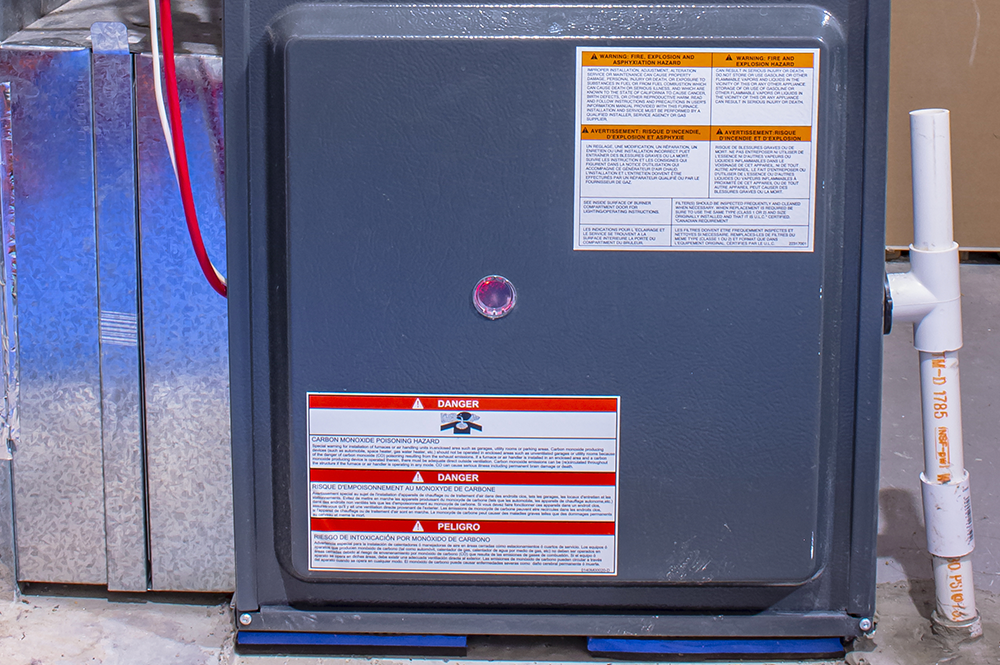 The blinking red light on a Lennox furnace control board indicates a specific fault that can often be diagnosed by counting the flash pattern.
Credit: Docdancer.com
If you have a Lennox furnace with a blinking red light, it may indicate a fuel error or ignition malfunction. This could be due to a dirty flame sensor. Try troubleshooting the issue by cleaning the flame sensor or seeking professional help if needed.
Checking For Gas Supply
If you notice a blinking red light on your Lennox furnace, the first step in troubleshooting fuel errors is to check for gas supply. Here are a few steps to follow:
Ensure that the gas valve is turned on and supplying the furnace with gas.
Check if there are any gas leaks. Use a gas leak detector or soapy water and apply it to the gas connections. If you see any bubbles forming, it indicates a gas leak.
If you suspect a gas leak, turn off the gas supply immediately and contact a professional HVAC technician for assistance.
Inspecting The Burner Assembly
The next troubleshooting step involves inspecting the burner assembly for any issues. Here's what you can do:
Remove the burner access panel and visually inspect the burner assembly for any signs of dirt, debris, or blockages.
Clean the burner assembly using a soft brush or compressed air to remove any accumulated dirt or debris.
Ensure that all burner ports are clear and free from obstructions.
Check the flame sensor located near the burner assembly. If it appears dirty or covered in soot, clean it using a soft cloth or fine sandpaper.
Cleaning The Burner Assembly
To further troubleshoot the fuel errors, cleaning the burner assembly is essential. Follow these steps:
Steps Description
1 Turn off the furnace and disconnect the power supply.
2 Remove the burner assembly by unscrewing or unclipping it from its position.
3 Place the burner assembly on a clean surface and carefully inspect it for dirt, rust, or other contaminants.
4 Use a soft brush or vacuum cleaner to remove any debris or dirt from the burner assembly.
5 If needed, use mild soap and water to clean the burner assembly. Rinse thoroughly and allow it to dry completely before reassembling.
6 Reinstall the burner assembly and ensure it is securely fastened.
Verifying The Gas Pressure
Low gas pressure is a less obvious but common cause of fuel errors on a Lennox furnace. If the gas valve is open and you smell gas but the burner doesn't light or flames look weak and orange, the incoming pressure may be too low. Most residential natural gas furnaces require a manifold pressure of around 3.5 inches of water column (for natural gas) or 10–11 inches (for propane). You can check the input pressure at the gas valve's pressure tap using a manometer—this is a job best left to a professional. A technician can also adjust the regulator at your gas meter if the street pressure is low. If you have intermittent problems that seem worse during cold snaps, increased community gas demand can temporarily drop pressure, causing the furnace to lock out with a blinking red light.
Troubleshooting Tips For Fault Proving Failures
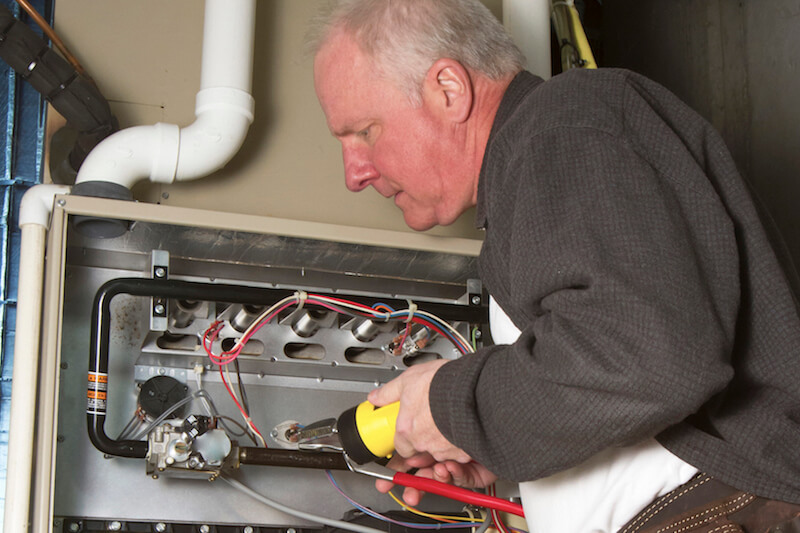 Inspecting the combustion chamber and burner assembly is a key step when diagnosing a blinking red light on a Lennox furnace.
Credit: bghvac.com
Having a Lennox furnace blinking red light can be worrisome, but understanding how to troubleshoot common issues can help you resolve the problem quickly. In this section, we will provide you with some helpful tips to identify and solve fault proving failures in your Lennox furnace.
Inspecting The Ignition System
One possible reason for the red blinking light on your Lennox furnace is an ignition system malfunction. To inspect the ignition system, follow these steps:
Turn off the power to the furnace.
Locate the ignition system components, such as the igniter and flame sensor.
Carefully clean the igniter and flame sensor with a soft brush or cloth.
Inspect the wiring and connections for any loose or damaged parts.
If everything appears to be in order, turn the power back on and observe if the red blinking light persists.
Checking The Combustion Chamber
Another possible cause of the red blinking light is a combustion chamber issue. Follow these steps to check the combustion chamber:
Ensure the furnace is turned off and the power is disconnected.
Remove the access panel to access the combustion chamber.
Inspect the chamber for any signs of blockages or debris.
Clean out any debris you find using a vacuum or a soft brush.
Examine the flame sensor and clean it if necessary.
Replace the access panel and reconnect the power.
Examining The Fault Codes
Your Lennox furnace may have fault codes that can provide valuable information about the issue. To examine the fault codes:
Locate the control panel on your Lennox furnace.
Refer to the manufacturer's manual to understand the fault codes specific to your model.
Read and record any fault codes displayed on the panel.
Use the recorded fault codes to identify the problem and refer to the manual for troubleshooting steps.
By following these troubleshooting tips, you can often identify and resolve the issue causing the red blinking light on your Lennox furnace. However, if the problem persists or if you are unsure about performing these steps yourself, it is recommended to seek assistance from a professional HVAC technician.
Resetting A Lennox Furnace
If you have a Lennox furnace and notice a blinking red light, it could indicate a fuel error, ignition malfunction, or flame-proving failure. One simple solution to fix this issue is to reset your Lennox furnace. In this section, we will guide you through the process of resetting your furnace, step by step.
Locating The Control Panel
The first step in resetting your Lennox furnace is to locate the control panel. The control panel is typically located on the lowermost panel in downflow furnaces or on the top panel in other models. Take a moment to find the control panel on your furnace.
Identifying The Reset Button
Once you have located the control panel on your Lennox furnace, you need to identify the reset button. Look for a raised button or a switch labeled "Limit Control." This is the button you will need to press and release in order to reset your furnace.
Performing A System Reset
Now that you have located the control panel and identified the reset button, it's time to perform a system reset on your Lennox furnace. Follow these steps:
Make sure the furnace is powered on.
Locate the reset button on the control panel.
Press and release the reset button. You may hear a clicking sound.
Wait for a few minutes to allow the furnace to reset.
After the reset, check if the blinking red light has stopped.
If the blinking red light persists after the reset, it is recommended to contact a professional HVAC technician for further assistance. They will be able to diagnose the issue and provide the necessary repairs or maintenance.
Resetting your Lennox furnace can sometimes resolve minor issues and restore the normal operation of the system. However, if you encounter persistent problems, it's best to seek professional help to ensure the safety and efficiency of your furnace.
READ MORE : Goodman Furnace Blinking Red Light
When To Call A Professional
While many blinking red light issues can be resolved with basic cleaning and resets, some situations demand a trained HVAC technician. Call a professional if:
- You have performed the troubleshooting steps above and the red light returns within 24 hours.
- You smell natural gas or propane near the furnace—leave the house immediately and call your gas company.
- The furnace repeatedly tries to ignite and fails, creating a strong gas odor.
- You are uncomfortable working around high-voltage electrical components or gas lines.
- Your furnace is still under warranty—unauthorized repairs can void coverage.
A licensed technician can perform a combustion analysis, measure gas pressure precisely, and check the heat exchanger for cracks. According to the U.S. Department of Energy, annual professional maintenance can extend furnace life by several years and improve efficiency by up to 15 percent. If you have a similar issue on a different brand, you might want to review the details for a Goodman furnace as well—some troubleshooting steps overlap.
Preventive Maintenance To Avoid Future Red Lights
The best way to deal with a blinking red light is to prevent it from happening in the first place. Routine maintenance keeps your Lennox furnace running reliably through the coldest months. Here are key tasks to perform at the start of each heating season:
- Replace the air filter every 1–3 months – A clogged filter is the number one cause of limit switch trips and overheating. Use a filter with the correct MERV rating for your model (typically MERV 8 for standard residential units).
- Clean the flame sensor annually – As shown in the troubleshooting section above, this simple cleaning takes about 10 minutes and prevents most ignition-related red lights.
- Inspect the condensate drain line – On high-efficiency Lennox models, a clogged drain can trigger a pressure switch fault. Pour a cup of white vinegar down the drain line each fall to clear algae buildup.
- Check the outdoor vent termination – Snow, ice, or debris blocking the exhaust or intake pipes can cause a pressure switch error. Clear any obstructions before they cause a lockout.
- Schedule a professional tune-up – Have an HVAC technician inspect the heat exchanger, measure gas pressure, and test safety controls at least once a year. This is especially important for older furnaces approaching 15–20 years of service.
A small investment in routine upkeep can save you the frustration of a cold house and an emergency service call in the middle of winter. For homeowners with smart thermostats, be aware that a cycling furnace can sometimes be misinterpreted by the thermostat—if you have a Nest thermostat that shows a red blinking light, the issue may actually be at the furnace itself.
External Resources
For official support and up-to-date product documentation, visit the Lennox official support page where you can find model-specific manuals, warranty information, and dealer locators. The EPA's ENERGY STAR program also offers guidance on furnace maintenance and efficiency that can help extend the life of your heating system.
Frequently Asked Questions
[su_accordion][su_spoiler title="What Does Flashing Red Light On Lennox Furnace Mean?" open="no" style="default" icon="plus" anchor="" anchor_in_url="no" class=""]A flashing red light on a Lennox furnace usually indicates a fuel error, ignition malfunction, or flame-proving failure in the combustion assembly area. This could be due to a dirty flame sensor.[/su_spoiler] [su_spoiler title="Why Is My Furnace Flashing A Red Light?" open="no" style="default" icon="plus" anchor="" anchor_in_url="no" class=""]
A flashing red light on your furnace typically indicates a combustion failure, fuel issue, or flame-proving failure. This could be due to a dirty flame sensor. Make sure to check if your filters are clogged or if there is any blockage that needs to be removed by a professional.
Resetting the system may also solve the problem.[/su_spoiler] [su_spoiler title="Why Is My Lennox Furnace Blinking A Red Light?" open="no" style="default" icon="plus" anchor="" anchor_in_url="no" class=""]The red blinking light on your Lennox furnace usually indicates a fuel error, ignition malfunction or flame-proving failure in the combustion assembly area.[/su_spoiler] [su_spoiler title="How Many Blinks Does A Lennox Furnace Give For A Flame Sensor Issue?" open="no" style="default" icon="plus" anchor="" anchor_in_url="no" class=""]On most Lennox models, a flame sense failure is indicated by 1 blink followed by a pause. However, this can vary by model year. Always check the code chart on your furnace's access panel or in the owner's manual for the exact pattern.[/su_spoiler] [su_spoiler title="Can I Reset My Lennox Furnace Without A Button?" open="no" style="default" icon="plus" anchor="" anchor_in_url="no" class=""]Some newer Lennox models use a power-cycle reset instead of a physical button. Simply turn the furnace off at the circuit breaker, wait 30 seconds, and turn it back on. This clears temporary faults but will not fix underlying hardware issues.[/su_spoiler] [su_spoiler title="Will A Dirty Air Filter Cause A Blinking Red Light On A Lennox Furnace?" open="no" style="default" icon="plus" anchor="" anchor_in_url="no" class=""]Yes. A severely clogged air filter restricts airflow, causing the limit switch to overheat and trip. This often results in a 2-blink or 4-blink error code, depending on the model. Replacing the filter is the easiest fix to try first.[/su_spoiler][/su_accordion]
So there you have it, your comprehensive guide to deciphering and troubleshooting that pesky red blinking light on your Lennox furnace. From cleaning the flame sensor to checking for fuel errors and ignition malfunctions, we've covered it all. However, if you find yourself in need of further assistance or have specific questions about your furnace, don't hesitate to drop us a comment below. Our team of experts is here to help ensure your home stays warm and comfortable all year round. Stay cozy, friends!
Conclusion
A blinking red light on your Lennox furnace doesn't have to ruin your winter. In most cases, the issue is something you can resolve yourself—cleaning a dirty flame sensor, replacing a clogged air filter, or resetting the system after a temporary glitch. By counting the blink pattern and working through the troubleshooting steps in this guide, you'll often have your heat back within an hour. For persistent problems or anything involving gas or high voltage, don't hesitate to bring in a qualified HVAC technician. Your next clear step: start by replacing your furnace filter and checking the blink code on your control panel this evening—it's quick, costs nothing, and could save you a service call.