Title: Whirlpool Dishwasher Start Light Blinking
If the start light on your Whirlpool dishwasher is blinking, it may indicate a problem with the heating element or a short in the keypad. To troubleshoot, check the heating element for continuity using a multimeter.
If the water doesn't reach the proper temperature within a certain time frame, the start light may start flashing. Additionally, turning off the dishwasher, fully opening the door, closing it again, and then turning it back on may help resolve the issue.
It's also possible that the touch control panel has a stuck or shorted button, causing the start light to blink. In this case, pressing and holding the start or reset button for at least one minute may reset the dishwasher.
Understanding The Issue
If you have a Whirlpool Dishwasher with the start light blinking, it may indicate a problem with the heating element. Use a multimeter to test for continuity and determine if the heating element has burned out. Alternatively, you can try resetting the blinking light by turning off the dishwasher, opening the door fully, closing it again, and then turning it back on.
Reasons For Whirlpool Dishwasher Start Light Blinking
There can be several reasons why the start light on your Whirlpool dishwasher is blinking. Understanding these reasons can help you troubleshoot and resolve the issue quickly. Here are some common causes for the start light blinking:
Heating Element Failure: The heating element in your dishwasher heats up the water to the operating temperature. If the water fails to reach the proper temperature within a specific time frame, the control panel's light might start flashing. You can use a multimeter to test the heating element for continuity.
Water Temperature: Improper water temperature can also impact the operation of your dishwasher, causing the start light to blink. Ensure that the water entering the dishwasher is at the correct temperature as specified in the manufacturer's guidelines.
Keypad Short or Stuck: A short or stuck button on the dishwasher keypad can also trigger the start light to blink. This can happen if there is a problem with the control board or if the buttons are not functioning properly.
Interrupted Cycle: If the dishwasher was in progress but got interrupted, the start light could blink. This interruption could be due to a power outage or an accidental button press.
In our experience, the heating element failure is responsible for the majority of blinking start light complaints on modern Whirlpool models. A common mistake is immediately blaming the control board without first verifying the heating element or the high-limit thermostat. Understanding similar diagnostics on other appliances can give you a broader perspective on how these circuits work. For example, samsung's diagnostic system provides codes on a separate panel, while bosch dishwasher codes are output through a series of red flashes.
Impact Of Improper Water Temperature On Dishwasher Operation
Proper water temperature is crucial for the efficient operation of your Whirlpool dishwasher. Here's how improper water temperature can impact your dishwasher:
Inefficient Cleaning: If the water entering the dishwasher is too cold, it may not effectively clean your dishes. Cold water might not dissolve detergent properly, leading to residue or spots on your dishes.
Extended Cycle Time: When the water is not at the optimum temperature, your dishwasher may take longer to complete a cycle. This can result in increased energy consumption and longer waiting times for clean dishes.
Potential Damage: Extremely hot water can damage delicate dishes or plastic items. On the other hand, very cold water can cause thermal shock, leading to cracks or breakage in glassware.
Sanitization Concerns: To ensure proper sanitization, your dishwasher requires water at a certain temperature. Improper water temperature may compromise the effectiveness of the sanitization process, compromising your family's safety.
By understanding the reasons for the start light blinking and the impact of improper water temperature, you can take the necessary steps to resolve the issue and ensure proper functioning of your Whirlpool dishwasher.
Testing The Heating Element
If the start light on your Whirlpool dishwasher is blinking, it may indicate a problem with the heating element. Use a multimeter to test the heating element for continuity and determine if it needs to be replaced. This simple troubleshooting step can help you fix the issue and get your dishwasher running smoothly again.
Using A Multimeter To Check The Heating Element For Continuity
To troubleshoot the issue of the Whirlpool dishwasher start light blinking, one potential cause could be a faulty heating element. The heating element is responsible for heating up the water to the proper temperature during the dishwasher's cycle. If the water doesn't reach the desired temperature within a set amount of time, it can trigger the start light to blink.
To check if the heating element is functioning correctly, you can use a multimeter to test it for continuity. This will determine if there is a break in the electrical circuit, indicating a burnt-out or damaged heating element.
Step-by-step Guide For Testing The Heating Element
Start by turning off the Whirlpool dishwasher and unplugging it from the power source to ensure your safety throughout the testing process.
Locate the heating element, which is typically located at the bottom of the dishwasher and may have two terminals connected to it.
Using a multimeter set to the continuity or ohms setting, touch one probe to each terminal of the heating element.
If the multimeter displays a reading close to zero or beeps, it indicates that the heating element has continuity, meaning it is functioning properly.
However, if the multimeter does not display any reading or remains at infinity, it suggests that the heating element does not have continuity, indicating a fault in the element.
If the heating element fails the continuity test, it will need to be replaced to resolve the issue of the start light blinking.
By following this step-by-step guide and using a multimeter to check the heating element for continuity, you can identify if a faulty heating element is causing the Whirlpool dishwasher start light to blink. If the heating element is indeed damaged, replacing it should resolve the issue and restore the proper functioning of your dishwasher.
When testing terminals, always handle probes by the insulated grips. Basic electrical safety practices from the Occupational Safety and Health Administration are worth reviewing if you are new to using a multimeter. For a broader look at how continuity testing is applied in other gadgets, the same continuity testing methodology is used for troubleshooting a dyson vacuum's blinking light indicator.
Resetting The Blinking Light
To reset the blinking light on a Whirlpool dishwasher, first check if the water is reaching the proper temperature. If not, the heating element may need to be tested for continuity using a multimeter. Another option is to turn off the dishwasher, fully open the door, close it again, and turn it back on.
If the start light continues to blink, it may indicate a short or stuck button on the touch control panel.
How To Reset The Blinking Light On A Whirlpool Dishwasher
If you're facing the frustrating issue of your Whirlpool dishwasher start light blinking, don't worry, there's a simple solution to reset the blinking light. Follow these steps to get your dishwasher back up and running smoothly:
Start by turning off the dishwasher and opening the door fully.
Leave the door open for a few seconds, and then close it back again.
Now, turn the dishwasher back on, and you should notice that the blinking light has been reset.
These quick steps can often resolve the blinking light issue on your Whirlpool dishwasher, allowing you to continue with your dishwashing tasks without any interruptions. If the problem persists, don't worry, there are additional troubleshooting steps you can take.
Troubleshooting Steps To Resolve The Blinking Light Issue
Check the heating element: The heating element in your Whirlpool dishwasher is responsible for heating up the water to the operating temperature. If it has burned out, the water may not reach the proper temperature, causing the blinking light. Use a multimeter to test the heating element for continuity. If it's faulty, replace it.
Inspect the control panel: A short in the keypad can also cause the start light to blink. Check if any buttons are stuck or unresponsive. If so, you may need to replace the control panel.
Ensure proper water supply: Make sure the water supply to the dishwasher is adequate. A low water pressure or clogged inlet valve can prevent the dishwasher from functioning properly. Clean or replace the inlet valve if necessary.
Check for error codes: Some Whirlpool dishwashers have error code features that can help diagnose the issue. Refer to the user manual or contact Whirlpool customer support for guidance on interpreting and resolving specific error codes.
Power cycle the dishwasher: Sometimes, a simple power cycle can resolve minor glitches. Turn off the dishwasher, unplug it from the power source, wait for a few minutes, and then plug it back in. Turn it on and see if the blinking light issue is resolved.
By following these troubleshooting steps, you should be able to identify and address the underlying cause of the blinking light issue on your Whirlpool dishwasher. If the problem persists or if you're unsure about the best course of action, it's always recommended to seek professional assistance to ensure a proper and safe resolution.
Keypad And Control Panel Issues
One common issue that Whirlpool dishwasher owners may encounter is a blinking start light on the control panel. This blinking light can be indicative of a problem with the keypad and control panel. In this section, we will explore the potential causes of a shorted or stuck button on the control panel and provide ways to fix these keypad and control panel problems.
Potential Causes Of A Shorted Or Stuck Button On The Control Panel
There are several potential causes for a shorted or stuck button on the control panel of your Whirlpool dishwasher. These include:
Accumulated dirt or debris: Over time, dirt, grease, and food particles can build up on the keypad and control panel, causing the buttons to become stuck or unresponsive.
Moisture or liquid spills: If moisture or liquid spills onto the control panel, it can seep into the buttons, leading to a short circuit or button malfunction.
Electrical issues: Faulty wiring or a malfunctioning control board can also result in a shorted or stuck button on the control panel.
These failures are often easy to confuse with a true control board issue. Comparing the symptoms to lg diagnostics can help you differentiate between a sticky keypad and a failed electronic relay.
Ways To Fix The Keypad And Control Panel Problems
If you're experiencing a blinking start light due to a shorted or stuck button on the control panel of your Whirlpool dishwasher, here are some steps you can take to fix the issue:
Disconnect power: Before attempting any repairs, always disconnect the power supply to your dishwasher to ensure your safety.
Clean the keypad and control panel: Use a soft cloth dampened with a mild cleanser to gently clean the keypad and control panel. Be sure to remove any dirt, grease, or food residue that may be causing the buttons to stick.
Check for moisture or liquid spills: Inspect the control panel for any signs of moisture or liquid spills. If you find any, carefully dry the area using a soft, dry cloth.
Inspect the wiring: If you suspect a wiring issue, carefully examine the wiring connections and look for any frayed or damaged wires. If necessary, consult a professional electrician to resolve any electrical problems.
Reset the control panel: In some cases, resetting the control panel can help resolve button malfunctions. Refer to your Whirlpool dishwasher's user manual for instructions on how to perform a control panel reset.
Replace the control panel: If all else fails, you may need to replace the control panel of your Whirlpool dishwasher. Contact a certified Whirlpool technician or refer to your user manual for guidance on ordering and installing a new control panel.
By following these steps, you can address and resolve keypad and control panel issues that may be causing the start light on your Whirlpool dishwasher to blink. Remember to always prioritize your safety by disconnecting the power supply before attempting any repairs and consult a professional if needed.
Decoding Whirlpool Dishwasher Error Codes
Depending on your Whirlpool model, the blinking start light may follow a specific pattern (e.g., 3 flashes, 4 flashes, 5 flashes). These flash patterns are diagnostic codes that can pinpoint the issue without needing a multimeter.
3 Flashes: Heating element failure or high-limit thermostat open. 4 Flashes: Water temperature sensor (thermistor) fault. 5 Flashes: Control board / keypad communication error. 6 Flashes: Water inlet or drain timeout. 7 Flashes: Heating element relay stuck. 8 Flashes: Door latch / micro switch failure.
If your start light is blinking in a pattern, count the flashes carefully. This can save hours of guesswork. Note that older Whirlpool models may use a different numbering system; checking your specific manual is always best. For the most up-to-date information, refer to Whirlpool's official portal. Just as refrigerator fault codes can display a specific error on a separate panel, Whirlpool's integrated system uses the start light exclusively.
Inspecting the Door Latch and Micro Switch
One frequently overlooked cause of a blinking start light is a faulty door latch assembly. The dishwasher won't proceed with its cycle if the control board doesn't register that the door is fully closed. Over time, the plastic latch can wear down or the internal micro switch can fail.
How to test: With the dishwasher powered on, press the door firmly shut. If the start light stops blinking or the sound changes, the latch may be loose. You can test the micro switch with a multimeter for continuity when the door is closed. If the switch fails to close the circuit, it must be replaced. Unlike testing the heating element, the door latch issue often prevents the motor from running altogether.
If you have ruled out the heating element, thermostat, and door latch, the problem likely lies in the control board itself. Much like a thermostat that blinks red to signal a low battery or wiring fault, the dishwasher's flashing light indicates a need for board replacement.
Detergent and Over-Sudsing Issues
Using hand dish soap or excessive detergent in a Whirlpool dishwasher can create a massive overflow of suds. This triggers the dishwasher's flood prevention lockout, causing the start light to blink frantically and the pump to run continuously without starting a cycle.
What to do: If you suspect over-sudsing, immediately stop the cycle, open the door, and scoop out as many suds as possible. Sprinkle salt or pour a cup of white vinegar into the bottom of the unit to kill the remaining suds. Run a rinse cycle without detergent. Never use hand dishwashing liquid in an automatic dishwasher, as it is specifically formulated for high-suds environments.
When to Call a Professional Repair Technician
While many causes of a blinking start light are DIY-friendly, some issues require professional service. You should call a technician if:
- The control board shows signs of burning or physical damage.
- You have tested the heating element, thermostat, and door latch, but the error persists.
- The integrated error code points to a control board failure (5 or 7 flashes), as board replacement often requires firmware pairing unavailable to consumers.
- There is a visible short or spark when plugging the unit in.
Attempting complex repairs on a dishwasher's main control board without proper training can lead to further damage or electrical shock.
Other Troubleshooting Methods
When your Whirlpool dishwasher's start light is blinking, it can be frustrating and indicate a problem with the appliance. However, there are several troubleshooting methods that you can try to resolve the issue before calling for professional help. In this section, we will address two common issues related to dirty water sensing by the control board and steps to resolve flashing lights on the control panel.
Addressing Issues Related To Dirty Water Sensing By The Control Board
If your Whirlpool dishwasher's start light is blinking due to the control board sensing dirty water, there are a few steps you can take to resolve the issue:
First, ensure that the dishwasher is properly connected to the water supply and that the water inlet valve is functioning correctly.
Check the dishwasher's filters and clean them if they are clogged or dirty.
Inspect the spray arms for any blockages that may prevent proper water circulation.
Run a cleaning cycle with a dishwasher cleaner to remove any built-up residue or mineral deposits.
If the issue persists, it may be necessary to replace the control board. Consult the appliance's manual or contact Whirlpool customer support for further guidance.
Steps To Resolve Flashing Lights On The Control Panel
If the lights on your Whirlpool dishwasher's control panel are blinking, follow these steps to resolve the issue:
First, try pressing the "Cancel" button to reset the dishwasher.
If that doesn't work, turn off the dishwasher and unplug it from the power source for a few minutes, then plug it back in and turn it on.
Check for any error codes displayed on the control panel, and consult the appliance's manual or online resources for troubleshooting steps specific to your model.
Inspect the control panel for any stuck or malfunctioning buttons. If you find any, try gently cleaning or pressing them to see if that resolves the issue.
If the problem persists, it may be necessary to replace the control panel or seek professional assistance.
By following these troubleshooting methods, you can hopefully resolve the issue of the Whirlpool dishwasher start light blinking. However, if the problem persists or you are unsure about performing any of the steps, it is always recommended to consult a professional technician or contact Whirlpool customer support for further assistance.
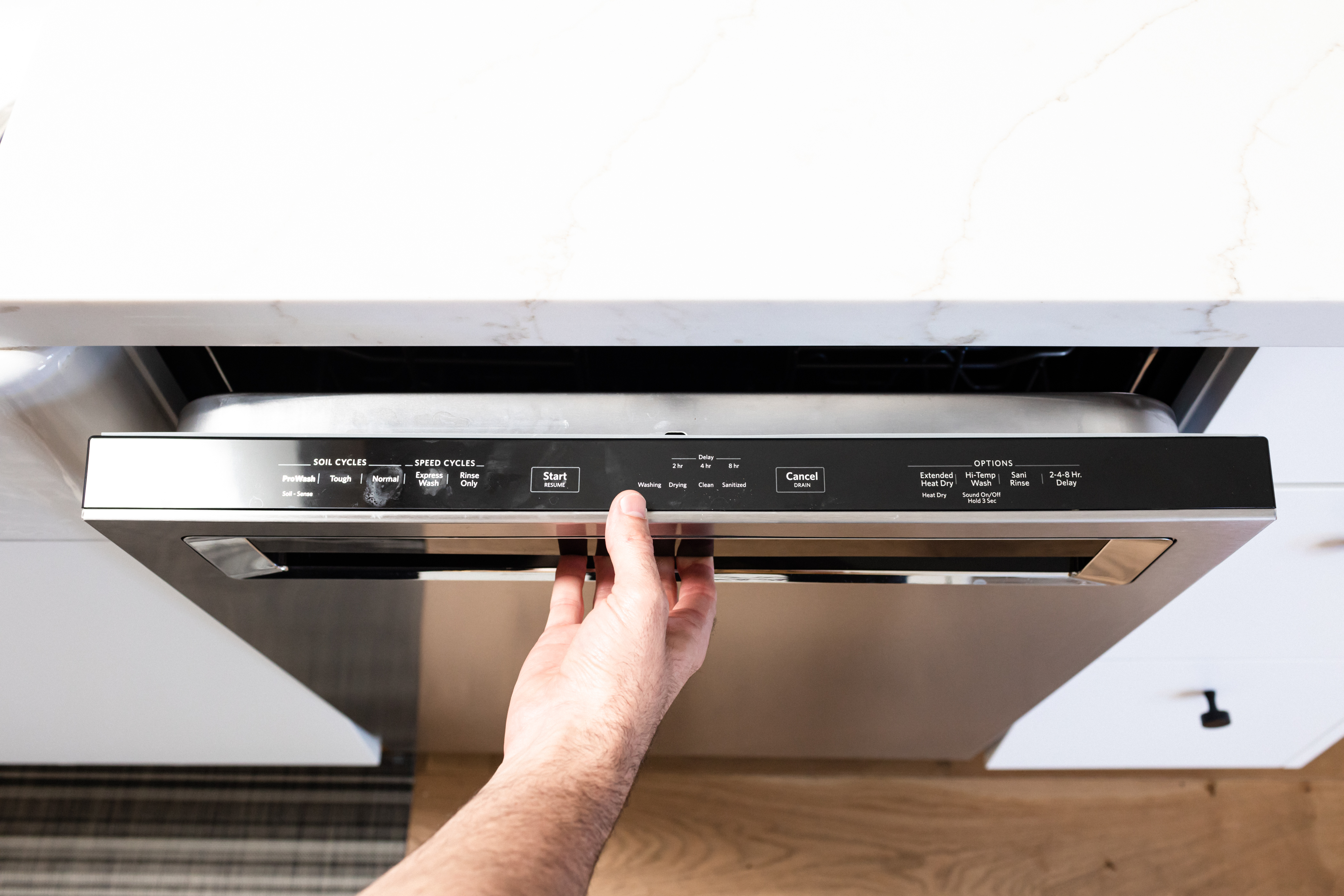 A Whirlpool dishwasher's control panel displaying the blinking start light during a typical fault condition.
Credit: www.hunker.com
Frequently Asked Questions For Whirlpool Dishwasher Start Light Blinking
Why Is The Start Resume Blinking On My Whirlpool Dishwasher?
The start button on your Whirlpool dishwasher blinks when the water doesn't reach the proper temperature after a set amount of time. This could be due to a burned-out heating element. You can test the heating element with a multimeter for continuity. If the problem persists, it might be a short or stuck button on the control panel. Try resetting the dishwasher by holding the start/reset button for one minute.
Why Is The Start Button Blinking On My Dishwasher?
If the start button is blinking on your dishwasher, it may indicate a problem with the heating element. Check if the water reaches the proper temperature. If not, the control panel light might start flashing. Use a multimeter to test the heating element for continuity. Resetting the dishwasher or checking for a shorted or stuck button on the touch control panel may also help resolve the issue.
Why Is The Start Light Flashing 3 Times On My Whirlpool Dishwasher?
The start light on your Whirlpool dishwasher is flashing 3 times because the water is not reaching the proper temperature. This could be due to a burned out heating element. Test the element with a multimeter for continuity. Reset the dishwasher or hold the start/reset button for one minute to see if it resolves the issue.
How Do You Reset A Whirlpool Dishwasher?
To reset a Whirlpool dishwasher, try unplugging it for a few minutes and then plugging it back in. If that doesn't work, press and hold the start/reset button for at least one full minute.
Why Is The Start Light On My Whirlpool Dishwasher Blinking?
The start light on your Whirlpool dishwasher may blink if the heating element doesn't heat up the water to the proper temperature within a set amount of time. This could be due to a burned-out heating element. Test it using a multimeter for continuity.
Why is my Whirlpool dishwasher light blinking after a power outage?
After a power surge or outage, the control board may enter a protection mode. Perform a hard reset by unplugging the dishwasher (or turning off the breaker) for five full minutes. This drains residual power from the board's capacitors and clears temporary fault codes. Plug it back in and the blinking start light should usually clear.
Can a clogged drain cause the start light to blink on a Whirlpool dishwasher?
Yes, if the dishwasher cannot drain water effectively, the control board will detect a water level error and blink the start light. Check the drain hose for kinks and clean the filter assembly at the bottom of the tub. A clogged drain pump impeller can also trigger this error.
Conclusion
Before purchasing any replacement part, whether a heating element or a control panel, confirm your exact model number against the official specifications for a guaranteed fit.
If you're experiencing the frustrating issue of your Whirlpool dishwasher's start light blinking, there could be a problem with the heating element. This can cause the water to not reach the proper temperature, triggering the blinking light on the control panel. To troubleshoot, you can test the heating element for continuity using a multimeter. Remember to turn off the dishwasher and open the door fully before closing it again to possibly resolve the issue. If the problem persists, it's best to seek professional help. Don't let a blinking light dampen your dishwashing experience!