If the Samsung Dishwasher Express 60 is blinking, it indicates a water pressure or water temperature issue, possibly caused by a kinked water line hose. To resolve this problem, check the water line hose for any kinks or obstructions that may be affecting water flow.

The Express 60 light blinking on a Samsung dishwasher control panel signals an operational fault that needs troubleshooting.
Credit: m.youtube.com
Common Reasons For Samsung Dishwasher Express 60 Blinking
If you own a Samsung Dishwasher Express 60 and notice that the normal light is blinking, there could be several underlying issues causing this problem. In this section, we will explore the common reasons for the Samsung Dishwasher Express 60 blinking and how to troubleshoot them.
Water Temperature Error
The blinking normal light on your Samsung Dishwasher Express 60 may indicate a water temperature error. This means that the water in the dishwasher did not reach the appropriate temperature within a certain timeframe. To troubleshoot this issue, you can check the heating element assembly for continuity using a multimeter. If the heating element is faulty, it may need to be replaced.
In practice, a water temperature error often occurs when the incoming water is too cold — below 120°F (49°C). If your home's water heater is set low or you're running other hot water appliances simultaneously, the dishwasher may not receive sufficient hot water to complete its cycle. Check your water heater thermostat setting first, as this is a simpler fix than replacing the heating element. A common mistake is assuming the heating element has failed when the real issue is simply inadequate hot water supply from your home's plumbing.
Leakage Error
Another possible cause for the blinking normal light is a leakage error. This occurs when there is a leak or moisture present in the dishwasher. To address this issue, you should locate the source of the leak or moisture and check the dishwasher components for any damage or clogs. Once you identify the problem, you can take appropriate measures to fix it. This may involve repairing or replacing damaged parts or unclogging any blocked components.
Over-level Water Error
The Samsung Dishwasher Express 60 blinking normal light may also indicate an over-level water error. This means that the water level in the dishwasher is too high. To resolve this issue, you can check the water supply valve to ensure it is open and allowing water to flow into the dishwasher properly. If the valve is closed or malfunctioning, it may need to be replaced.
Low-level Water Error
On the other hand, a blinking normal light can indicate a low-level water error. This means that the water level in the dishwasher is too low. To address this issue, you can check if the water line hose is kinked or obstructed, preventing proper water flow. If the hose is damaged or blocked, it may need to be replaced or cleared to ensure sufficient water supply to the dishwasher.
Stuck Button Error
The final common reason for the Samsung Dishwasher Express 60 blinking normal light is a stuck button error. This occurs when a button on the control panel is stuck or not functioning properly. To resolve this issue, you can gently press each button on the control panel to ensure they are not stuck. If you find any stuck buttons, you can try to release them or contact a technician for further assistance.
In conclusion, the blinking normal light on the Samsung Dishwasher Express 60 can be triggered by various reasons, including water temperature errors, leakage errors, over-level water errors, low-level water errors, and stuck button errors. By understanding these common reasons and following the recommended troubleshooting steps, you can identify and resolve the issue, ensuring your dishwasher operates smoothly and efficiently.
Quick Fixes For Samsung Dishwasher Express 60 Blinking
If you're experiencing the frustration of a Samsung Dishwasher Express 60 blinking, don't worry! In this article, we're going to discuss some quick fixes to help resolve this issue. By following these simple steps, you'll be able to troubleshoot and solve the problem efficiently. Let's take a look at some of the most common issues that can cause the blinking light and how to fix them.
Locate The Leak Or Source Of Moisture
The first thing you should do when your Samsung Dishwasher Express 60 is blinking is to locate the leak or source of moisture. This can help you identify the exact problem and take appropriate action. Check all the connections, including the water line hose and the drain hose, to ensure there are no leaks or loose connections. Sometimes, a simple tightening of the hose or sealing any cracks can resolve the issue.
Check Components For Damage Or Clogs
Next, check the different components of your dishwasher for any damage or clogs. Inspect the spray arms, filters, and drain pump for any debris or blockages that might be causing the blinking light. Clean these components thoroughly and ensure they are free from any obstructions that can hinder the dishwasher's performance.
Check Water Temperature
The water temperature plays a crucial role in the proper functioning of a dishwasher. If the water doesn't reach the correct temperature, it can trigger the blinking light. Use a thermometer to measure the water temperature during the dishwasher's cycle. If it's not within the recommended range, you may need to adjust your water heater settings or check for any issues with the heating element assembly.
Resetting The Dishwasher
In some cases, a simple reset of the dishwasher can fix the blinking light issue. To reset your Samsung Dishwasher Express 60, locate the power switch or circuit breaker and turn it off for a few minutes. After that, turn it back on and run a test cycle to see if the blinking light persists. This will help clear any temporary glitches and reset the dishwasher's settings.
Adjusting The Pressure Switch
If none of the above solutions work, it's time to check the pressure switch. The pressure switch regulates the water flow and pressure inside the dishwasher. Use the user manual or online resources to locate the pressure switch and adjust it according to the manufacturer's instructions. This can resolve any issues related to water pressure and potentially stop the blinking light.
By following these quick fixes, you can troubleshoot and resolve the blinking light issue on your Samsung Dishwasher Express 60. Remember to always refer to the user manual or seek professional help if needed. Happy dishwashing!
Additional Troubleshooting Steps
If you're experiencing a blinking light issue with your Samsung Dishwasher Express 60, there are a few additional troubleshooting steps you can take to pinpoint and resolve the problem. In this section, we'll discuss some common causes of the issue and provide instructions on how to test and fix them.
Test The Heating Element For Continuity
If the water in your dishwasher is not reaching the correct temperature, it could be due to a faulty heating element. To determine if this is the case, you can test the heating element for continuity using a multimeter. Here's how:
Disconnect the dishwasher from the power source.
Locate the heating element, usually located at the bottom of the dishwasher.
Using the multimeter, set it to the continuity or resistance mode.
Touch one probe to each terminal of the heating element.
If the multimeter shows a reading of zero or a low resistance value, the heating element is functioning properly. If it shows no reading or a high resistance value, the heating element may be faulty and needs to be replaced.
Check Water Supply Valve
A blinking light could also be a result of an issue with the water supply valve. To check the water supply valve, follow these steps:
Turn off the dishwasher and disconnect it from the power source.
Locate the water supply valve, usually located under the sink or behind the dishwasher.
Check if the valve is fully open by turning it clockwise until it stops.
If the valve is not fully open, turn it counterclockwise to open it completely.
Reconnect the dishwasher to the power source and check if the blinking light issue persists.
Inspect The Filter
A clogged or dirty filter can also cause the blinking light issue in your Samsung Dishwasher Express 60. Follow these steps to inspect and clean the filter:
Turn off the dishwasher and disconnect it from the power source.
Locate the filter, usually located at the bottom of the dishwasher.
Remove the filter and rinse it under running water to remove any debris or food particles.
Inspect the filter for any signs of damage or clogging. If the filter is damaged, replace it with a new one.
Reinstall the filter and reconnect the dishwasher to the power source. Test if the blinking light issue has been resolved.
Drain Issues
If the dishwasher is not draining properly, it can trigger the blinking light. To troubleshoot drain issues, follow these steps:
Turn off the dishwasher and disconnect it from the power source.
Check if the drain hose is kinked or clogged. If it is, straighten the hose and remove any debris or obstructions.
Remove the dishwasher's lower rack and inspect the drain area for any clogs. Remove any debris using a brush or sponge.
Reinstall the lower rack and reconnect the dishwasher to the power source.
Run a test cycle to see if the blinking light problem has been resolved.
Button Malfunction
In some cases, a blinking light issue can be caused by a malfunctioning button. To address this, follow these steps:
Disconnect the dishwasher from the power source.
Inspect the control panel for any buttons that are stuck or not working properly.
Gently press and release each button multiple times to ensure they are not stuck.
If a button remains unresponsive, it may need to be replaced. Contact Samsung's customer support or a professional technician for assistance.
Reconnect the dishwasher to the power source and test if the blinking light persists.
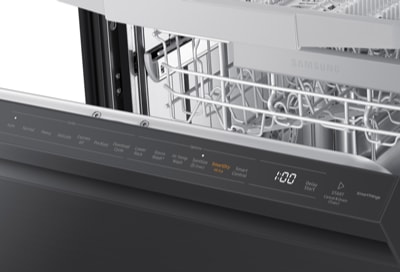
The control panel on a Samsung dishwasher showing the arrangement of cycle selection buttons and indicator lights.
Credit: www.samsung.com
Understanding Samsung Dishwasher Error Code Behavior
Beyond the blinking Express 60 light, Samsung dishwashers communicate specific fault conditions through distinct blinking patterns. The number of flashes and combination of illuminated lights help narrow down the exact problem. For example, if the Express 60 and Heavy lights blink together, this typically points to a drain issue rather than a water supply problem. Learning to read these patterns can save you time by directing your troubleshooting efforts to the right component first.
On 2024 and newer Samsung dishwasher models, the diagnostic system has been refined to display more precise sequences. If you have a newer unit, consult the error code chart in your user manual or the digital display panel for a direct alphanumeric code rather than relying solely on blinking light interpretations from earlier models.
How To Access And Read Diagnostic Mode
Samsung dishwashers include a hidden diagnostic mode that provides detailed fault history without needing a service technician. To access it, ensure the dishwasher is powered on but not running a cycle. Press the Power button, then press and hold the Start button for approximately 10 seconds. The control panel will enter a diagnostic test sequence where each cycle light blinks in a specific order. Count the number of flashes and consult Samsung's official service manual for your model number to decode the exact fault. If the diagnostic mode does not activate on your first attempt, disconnect the unit from power for 30 seconds and try again — a common mistake is not holding the button long enough.
For additional reference on interpreting blinking light patterns across different appliance brands, you may find it helpful to review how similar indicator issues are diagnosed in other devices, such as a blinking odometer or unusual light sequences on other household electronics.
Preventing Samsung Dishwasher Blinking Lights
If you're dealing with Samsung dishwasher Express 60 blinking lights, it could indicate water pressure or temperature issues, such as a kinked water line hose. Adjusting the pressure switch may help resolve the problem.
Proper Maintenance
Proper maintenance is key to preventing blinking lights on your Samsung dishwasher. Regularly inspect and clean the dishwasher components to ensure they are functioning properly. This includes checking for leaks or sources of moisture, as well as any damage or clogs in the dishwasher. Address any issues immediately to avoid further problems.
Regular Cleaning
Regularly cleaning your Samsung dishwasher is essential to prevent blinking lights. Clean the interior of the dishwasher, including the racks, filter, and spray arms. Remove any food particles or debris that may be obstructing the dishwasher's functionality. Use a mild detergent and non-abrasive sponge to clean the dishwasher, avoiding harsh chemicals that may damage the appliance.
Avoid Overloading
Avoid overloading your Samsung dishwasher, as this can lead to blinking lights. Overloading the dishwasher can prevent proper water circulation and hinder the dishwasher's ability to effectively clean your dishes. Follow the manufacturer's guidelines regarding load capacity to ensure optimum performance and prevent any blinking light issues.
Ensure Proper Water Line Connection
Ensure that the water line connection to your Samsung dishwasher is secure and free from any kinks or blockages. A kinked water line hose or improper water supply can result in water pressure or temperature problems, causing blinking lights on the dishwasher's control panel. Recheck the water line connection periodically and address any issues promptly.
Avoid Overheating
Preventing overheating is vital in preventing blinking lights on your Samsung dishwasher. Ensure that the dishwasher is not exposed to extreme heat or placed near heat-emitting appliances such as ovens or stoves. Excessive heat can affect the dishwasher's components and lead to malfunctioning, resulting in blinking lights.
When To Seek Professional Help
If you are experiencing a blinking express 60 light on your Samsung dishwasher, it is recommended to seek professional help to diagnose and fix the issue.
Persistent Or Frequent Blinking
If you notice that your Samsung Dishwasher Express 60's Normal light is persistently or frequently blinking, it may be an indication of a more significant problem. While occasional blinking lights are usually nothing to worry about and can be resolved with a simple reset, persistent blinking can be a sign of a more complex issue. In such cases, it is advisable to seek professional help. A certified technician will have the necessary expertise to diagnose and fix the underlying problem, ensuring that your dishwasher is back to its optimal performance.
Other Error Codes Displayed
In addition to the blinking Normal light, your Samsung Dishwasher Express 60 may display other error codes. These error codes can provide valuable information about what might be causing the issue. However, deciphering these error codes and determining the appropriate solution can be challenging for the average user. Professional help is highly recommended in such cases. An experienced technician will be able to interpret the error codes correctly and take the necessary steps to resolve the problem effectively.
Electrical Or Wiring Issues
If you suspect that your Samsung Dishwasher Express 60's blinking Normal light is due to electrical or wiring issues, it is essential to seek professional help immediately. Electrical problems can be hazardous and should not be taken lightly. A licensed technician will have the expertise to safely diagnose and repair any electrical or wiring issues that may be causing the blinking light. Attempting to fix electrical problems yourself can lead to further damage or pose a significant safety risk.
Mechanical Failures
Mechanical failures in your Samsung Dishwasher Express 60 can also cause the Normal light to blink. These failures can range from issues with the motor to problems with the spray arms or water inlet valve. Without proper knowledge and experience, attempting to fix mechanical failures yourself can be challenging and may lead to further damage. Professional assistance is strongly recommended in these situations. A qualified technician will be able to identify the mechanical problem accurately and provide a prompt solution to get your dishwasher running smoothly again.
Extended Warranty Coverage
If your Samsung Dishwasher Express 60 is still covered by an extended warranty, it is important to take advantage of it. Extended warranties can provide added protection and cost savings, especially when it comes to complex issues like persistent blinking lights. Contact the manufacturer or service provider associated with your warranty to schedule a repair. Their trained technicians will have the necessary expertise to diagnose and resolve the issue, ensuring that you don't have to bear the full cost of any repairs.
In conclusion, if you are experiencing persistent or frequent blinking lights on your Samsung Dishwasher Express 60, it is recommended to seek professional help. Whether it's due to electrical or wiring issues, other error codes being displayed, mechanical failures, or even to utilize your extended warranty coverage, a certified technician will have the knowledge and skills to diagnose and resolve the problem effectively. Don't hesitate to reach out for expert assistance to ensure optimal performance and longevity of your dishwasher.
Reference chart for Samsung dishwasher error codes that correspond to specific blinking light patterns on the control panel.
Credit: www.samsung.com
Frequently Asked Questions For Samsung Dishwasher Express 60 Blinking
Why Is My Samsung Dishwasher Auto And Express 60 Blinking?
If your Samsung dishwasher's auto and express 60 lights are blinking, it could indicate water pressure or water temperature problems. Check for a kinked water line hose or any other issues with the water supply.
What Is The Express 60 On A Samsung Dishwasher?
The express 60 on a Samsung dishwasher is a quick cycle option that allows you to wash your dishes in just 60 minutes. It is designed for when you need your dishes cleaned and dried quickly.
Why Is Samsung Dishwasher Light Flashing?
If the light on your Samsung dishwasher is flashing, it could indicate water pressure or water temperature problems. Check for a kinked water line hose or a stuck button on the control panel. You may need to test the heating element assembly for continuity to determine if it has burned out.
How Do I Reset The Code On My Samsung Dishwasher?
To reset the code on your Samsung dishwasher, check for any stuck buttons on the control panel. If there are any, gently press and release them to see if the issue resolves. If not, turn off the dishwasher's power for a few minutes, then turn it back on.
This should reset the code.
Why Is The Normal Light On My Samsung Dishwasher Blinking?
The blinking normal light indicates water temperature or pressure issues that need to be addressed.
Can A Clogged Drain Hose Cause The Express 60 Light To Blink?
Yes, a clogged or partially blocked drain hose can trigger the Express 60 blinking light. When water cannot drain properly, the dishwasher's sensor detects abnormal pressure in the system and signals an error. Check the drain hose for kinks, bends, or food debris buildup, and ensure the drain air gap (if your installation has one) is not blocked. This is a commonly overlooked cause that can mimic a water supply problem.
How Do I Know If My Dishwasher's Water Inlet Valve Is Bad?
A faulty water inlet valve may prevent your dishwasher from filling correctly, triggering the blinking Express 60 light. Signs of a bad inlet valve include no water entering the dishwasher, a humming sound without water flow, or visible corrosion around the valve connections. You can test the valve with a multimeter — a properly functioning valve should show continuity across its solenoid coil terminals. The water inlet valve is typically located behind the lower kickplate at the front of the dishwasher.
What If The Express 60 Light Still Blinks After Trying All Fixes?
If you have worked through all the troubleshooting steps — checking the water line, cleaning the filter, testing the heating element, resetting the unit, and inspecting for leaks — but the Express 60 light continues blinking, the issue likely involves the main control board or a wiring harness fault. At this stage, professional diagnostics are recommended. You can schedule an authorized Samsung service appointment or, if your unit is still under warranty, contact Samsung support for a no-cost repair. Avoid replacing the control board yourself, as improper handling can damage sensitive electronic components.
Conclusion
If you are experiencing a blinking normal light on your Samsung dishwasher, it could indicate water pressure or water temperature problems. This could be caused by a kinked water line hose or a stuck button. To resolve this issue, you can check for any damage or clogs in the components, ensure the water temperature is correct, and make sure the water supply valve is open.
By following these troubleshooting steps, you can fix the blinking normal light error on your Samsung dishwasher and get it back to working efficiently. For persistent issues that resist these fixes, don't hesitate to call in a certified technician — it's the fastest path to getting your appliance running reliably again.