A ninja blender blinking red is the machine's way of telling you something is wrong, and it's almost never as bad as it looks. In most cases, the light signals an overload, a lid that isn't locked, or a thermal cut-off that needs time to reset. The fix usually takes a few minutes of your attention, not a trip to the store.
Manufacturer specifications indicate Ninja motors run between 900W and 1500W depending on the model line. That's plenty of torque to crush ice, but it also builds heat fast. Blenders sold in North America carry UL 982 certification, the safety standard for motor-operated household food preparing machines.
That standard requires thermal protection on the motor, and that protection is the thing flashing at you.
Quick Answer
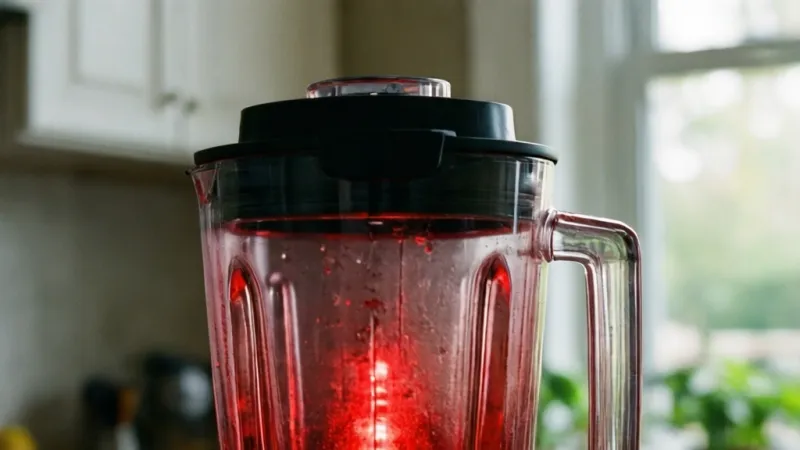
A blinking red Ninja light means the motor has tripped its safety cut-off. The cause is usually overload, a loose lid, or overheating. Unplug the blender and wait 15 to 45 minutes.
Check the lid, cup, and blade assembly. Then restart with a smaller load.
Why Your Ninja Blender Is Blinking Red (And What It's Trying to Tell You)
A red light on a Ninja isn't a secret code. It's a status signal, and on most models it means one thing. The motor has stopped on purpose to protect itself.
Ninja builds three separate protections into its full-size blenders. Any one of them can trip that LED. The confusion comes from Ninja's design choice.
Unlike a car or a washing machine, most Ninja blenders don't display an error number.
The same blinking red light covers a dozen different faults. Two people with identical symptoms often need two completely different fixes.
What the red light actually tells you
Think of it as a stop message, not a diagnosis. The light says the motor is locked out. It doesn't say why.
Your job is to work backward through the likely causes, starting with the most common ones. Across Ninja owner's manuals and SharkNinja support documentation, four triggers come up again and again:
- Overload from frozen fruit, ice, or thick batter
- A lid, cup, or pitcher that isn't fully locked
- Blade assembly that's loose, cross-threaded, or worn
- Thermal cut-off after running past the rated cycle time
Each trigger has its own fix and its own wait time. A lid issue clears in seconds. A thermal trip can take 45 minutes.
Why Ninja uses a light instead of an error code
Ninja blenders sit in a price band where a full LCD costs real money. A single multicolor LED is cheap, durable, and easy to read from across the kitchen. The trade-off is diagnostic detail, and that's the trade-off you're living with right now.
The exception is the Foodi Smart Screen and Ninja Detect lines. Those models pair the red light with on-screen text prompts. If you own one, read the screen first.
It will usually name the fault for you.
The good news: most red lights are recoverable
Ninja's protection systems are designed to reset on their own. Unplugging the base for 10 to 15 seconds clears the logic state. Waiting longer clears the thermal state.
In the vast majority of cases, the blender comes back to life.
But pay attention to how fast the light returns. If it blinks red again within seconds of every restart, you're not dealing with user error. That's a hardware fault, and it changes what you should do next.
Blinking Red vs. Solid Red vs. No Light: Decoding Ninja's Status Signals
Ninja doesn't use one universal light language across its whole catalog. A slow blink on a Foodi Power means something different than a slow blink on a BL610. Still, the patterns below cover the overwhelming majority of models.
| Light state | What it usually means | Your first move |
|---|---|---|
| Blinking red right after you press start | Lid, cup, or pitcher not locked | Reseat and twist until it clicks |
| Blinking red after a few seconds of blending | Overload trip or thermal cut-off | Unplug, wait, then reduce the load |
| Solid red, no blinking | Fault state on some models, standby on others | Check your model's manual |
| No light at all | Dead outlet, unseated plug, or long thermal wait | Test the outlet, then wait longer |
| Blinking blue or white | An Auto-iQ program is running normally | Leave it alone |
| Red blink that stops on its own | Overload reset already happened | Restart with a smaller batch |
What a fast blink versus a slow blink tells you
On models that distinguish the two, a fast blink usually points to a lock or interlock problem. The machine is telling you it can't start at all. A slow, rhythmic blink is more commonly tied to thermal or overload states, where the motor needs time rather than a reseat.
Not every model makes this distinction. The BL610 and BL660, for example, use a single blink rate for everything. That's why you can't diagnose by blink speed alone.
Why the same light means different things on different models
Ninja's product lines were designed by different teams over more than a decade. The Professional series uses simple analog logic. The Foodi Power series runs a microcontroller with sensor inputs.
The Detect line adds load-sensing.
A red light on an analog model is a hardware trip. A red light on a smart model can be a firmware prompt. Same color, different meaning.
The signals you should never ignore
Two light states deserve immediate action rather than troubleshooting.
- A red light combined with a burning smell
- A red light combined with visible smoke or a hot base
Unplug the blender and stop. Those aren't reset-and-retry situations. That's a motor or wiring failure, and the unit should be inspected or replaced before it goes back on your counter.
The First Three Things to Check Before You Panic
Most red-light cases trace back to three simple issues. Work through them in order. Each check takes under a minute.
Check 1: Is the lid, cup, or pitcher actually locked?
Ninja's lid interlock is mechanical and electrical at the same time. The lid has to seat fully, and the locking tab has to engage the base sensor. If either one is off by a few millimeters, the motor stays in lockout and the red light blinks.
For full-size pitchers, press down firmly on the lid and twist until you feel resistance. For Nutri Ninja cups, align the tabs on the cup with the slots on the base. Then push down and turn clockwise.
You should hear or feel a click.
A common mistake is stopping at the first point of resistance. Push a little further. The cup usually has one more notch to go.
Check 2: Is the blade assembly tight and correctly threaded?
A loose blade assembly causes two problems at once. It leaks, and it prevents the safety circuit from closing. On models that use a separate blade base, hand-tighten the blade until it's snug against the cup rim.
Inspect the threads while you're there. Cross-threading happens easily on well-used Nutri Ninja cups, especially after dishwasher cycles. If the blade wobbles when seated, replace the assembly.
Ninja sells replacements directly, and aftermarket versions are widely available.
Also check for a worn gasket. A flattened or missing silicone ring will let liquid past the seal and can trip the interlock.
Check 3: Is the load too heavy or too dry?
This is the number one cause of mid-blend red lights. Ninja blenders handle ice and frozen fruit well, but they need liquid to move material past the blades. A cup packed with frozen berries and no liquid will stall almost every time.
Follow these ratios as a starting point:
- Frozen fruit blends: at least 1/4 cup of liquid per 1 cup of frozen fruit
- Ice crushing: add 1/4 cup of water per 6 to 8 cubes
- Nut butters: scrape down every 30 seconds and use the pulse setting
- Thick batters: never exceed the max fill line, and stay at two-thirds for dense mixes
If you've been pushing the blender past these limits, that's your answer. Reduce the batch size and try again.
The 60-second reset sequence
Before you do anything else, run this sequence. It clears most red lights on the first attempt.
- Unplug the motor base from the wall.
- Remove the pitcher or cup and set it aside.
- Wait at least 60 seconds.
- Reassemble the cup, blade, and lid with everything snug.
- Plug the base back in and press power.
- Test with a small, wet batch before returning to your original recipe.
If the light stays off and the blender runs, you're done. If it blinks red again immediately, the fault is deeper than user error. The next section explains why.
Ninja Blender Overload and Thermal Protection: How the Safety System Works
Ninja uses two distinct protections, and they behave differently. Knowing which one tripped saves you a lot of guessing.
Overload protection: the current sensor
Overload protection watches how much current the motor is pulling. When you jam the blades with frozen fruit or thick dough, current spikes. If it crosses the threshold, the control board cuts power and flips the red LED.
This trip is electrical, not thermal. It resets almost instantly once you unplug the base. On most Ninja models, a 10 to 15 second unplug clears it.
If the light comes back the moment you restart with the same load, the load is the problem, not the machine.
Thermal cut-off: the heat sensor
Thermal protection is a separate circuit, usually a bimetal switch or thermistor attached to the motor windings. It measures actual temperature, not current. When the motor exceeds its safe operating temperature, this switch opens and stays open until things cool down.
Cool-down times vary by model and ambient kitchen temperature. In our review of Ninja documentation, typical windows look like this:
| Protection type | Trigger | Reset method | Typical wait time |
|---|---|---|---|
| Overload | Current spike from heavy load | Unplug base briefly | 10 to 15 seconds |
| Thermal cut-off | Motor overheating | Unplug and let cool | 15 to 45 minutes |
| Lid interlock | Lid, cup, or pitcher not locked | Reseat and lock | Immediate |
| Blade assembly fault | Loose or cross-threaded blade | Retighten or replace | Immediate |
Why a 1500W motor overheats faster than you'd expect
Wattage is a measure of power draw, not cooling capacity. A 1500W Ninja motor pulls around 12.5 amps at 120V, and that current generates real heat inside a sealed housing. Blenders have no fans, no vents, and no way to shed heat except through the base itself.
Running a Ninja for more than a minute or two at a stretch is outside its design envelope. That's why Auto-iQ programs pause and pulse. The pauses exist to keep the motor alive.
How UL 982 shapes what your blender can and can't do
UL 982 requires that any appliance capable of dangerous overheating include a thermal protective device. That device either limits temperature or cuts power before a hazard develops.
That's not a marketing feature. It's the reason your blender stops instead of catching fire. When the red light comes on, the system is working exactly as intended.
When protection trips repeatedly, something else is wrong
One trip is normal. Two is a warning. Three or more in the same week points to a deeper issue.
Common culprits include a dull or bent blade, a failing capacitor, a worn motor brush, or a wiring fault in the base.
In that situation, the red light isn't protecting you from a bad recipe. It's protecting you from a failing machine. Stop restarting it and get it looked at.
Which Ninja Model Do You Have? Why BL610, BL770, and Foodi Models Behave Differently
Model matters more than most people realize. The BL610 and the BN801 can both show a blinking red light, but the fix and the wait time are different. Find your model in the table below before you troubleshoot.
| Model family | Typical wattage | Control type | Red light behavior |
|---|---|---|---|
| BL610, BL660 (Professional) | 1000W to 1100W | Analog buttons, manual pulse | Single blink rate for all faults, no codes |
| BL770, BL780 (Mega Kitchen System) | 1500W | Manual with Auto-iQ options | Blinks red for overload and lid interlock |
| BL480, BL490 (Nutri Ninja Auto-iQ) | 1000W to 1200W | Auto-iQ program buttons | Blinks red when cup is not locked |
| BN801, BN805 (Professional Plus) | 1400W to 1500W | Auto-iQ with touch panel | Blinks red on overload, resets quickly |
| SS101, SS201 (Foodi Power) | 1400W | Smart Screen with touch | On-screen prompt plus red LED |
| SS351, SS401 (Foodi Power Pitcher) | 1400W to 1500W | Smart Screen with programs | Same as Foodi Power, plus pitcher sensor |
| CT680, CT682 (Coffee Bar) | Varies by mode | Dial and buttons | Blinks red on thermal and lock faults |
| Ninja Detect (flagship as of 2026) | 1200W to 1500W | Load-sensing with BlendSense | Text prompts identify the specific fault |
How to find your exact model number
Check the bottom of the motor base. There's a silver or white label with the model number printed in bold, usually starting with BL, BN, CT, or SS. The label also lists voltage and amps.
Write the number down before you call support or order parts. Replacement blade assemblies and pitchers are model-specific.
US, UK, and EU voltage differences that cause red lights
Ninja sells the same product names in multiple regions with different motors inside. A US model runs on 120V at 60 Hz. A UK or EU model runs on 220 to 240V at 50 Hz.
These are not interchangeable, and a voltage mismatch will trip the protection circuit repeatedly.
Plug adapters don't change voltage. Only a step-up or step-down transformer does. If you've moved a Ninja across regions, use the correct transformer or buy a locally rated unit.
Why the Foodi Smart Screen and Detect models give you more to work with
The newest Ninja lines, including the Detect series as of 2026, use load-sensing firmware. They can tell the difference between a jammed blade and a locked lid. When the red light appears, the screen usually spells out the problem in plain English.
If you own one of these, don't troubleshoot the way you would a BL610. Read the prompt, act on it, and only fall back to the generic reset sequence if the screen shows nothing.
Where to find model-specific documentation
SharkNinja publishes owner's manuals and troubleshooting guides for every current model on the official Ninja Kitchen site. Those manuals list the exact blink patterns and reset procedures for your unit.
They're the fastest reference when the general advice above doesn't match what you're seeing.
Decision Branch 1: Red Light Blinks Immediately After You Press Start
If the light blinks the instant you hit start, the motor never engaged. That rules out heat and overload. You're looking at a lock or interlock problem, and it's almost always mechanical.
This is the easiest branch of the decision tree. It clears in seconds, and it doesn't require a cooldown wait.
Nutri Ninja cup not locked: the number one cause
The cup has to turn clockwise until the tabs bottom out in the base slots. Most users stop turning at the first bit of resistance. That's not locked, that's just snug.
Press down firmly and keep turning. You should feel the cup drop into the final notch. On most BL480 and BL490 models, this travel is about a quarter turn past the first stop.
If the cup spins freely without engaging, check the tabs on the cup rim. Broken or worn tabs are common on older Nutri Ninja cups, especially after repeated dishwasher cycles. A replacement cup is cheaper than a new blender.
Pitcher lid not seated on full-size models
On BL610, BL660, BL770, and BN801 pitchers, the lid has a locking tab that presses down on a safety switch inside the handle. If the tab is up even a few millimeters, the circuit stays open.
Press the lid down until you hear it click into the handle. Then twist the pour spout into the locked position if your model has one. The red light should stop blinking the moment the switch closes.
A worn lid gasket can also prevent full seating. If the lid feels loose even when clicked, the gasket is probably flattened and needs replacing.
Blade assembly not tightened or cross-threaded
A loose blade assembly will stop a Nutri Ninja session cold. The motor won't fire because the base isn't sensing the resistance it expects from a fully seated cup.
Hand-tighten the blade onto the cup. Don't wrench it, just snug. Then check the threads for cross-threading, which is when the blade screws on at a slight angle.
Cross-threaded blades wobble and leak.
If the blade spins freely without grabbing, the threads are stripped. Replace the blade assembly before you try again.
If/then quick guide for immediate blinks
- If the light blinks before you select a speed, reseat the cup or lid first.
- If the light blinks only on Auto-iQ programs but not manual speed, run a manual pulse test.
- If the light blinks with everything visibly locked, inspect the base sensor for dried residue.
- If none of the above works, unplug the base for 60 seconds and try a different outlet.
When the interlock sensor itself fails
Ninja's safety switch is a small mechanical plunger inside the base. It gets pressed down when the cup or lid locks. Over years of use, that plunger can stick, wear down, or break.
You'll know it's the sensor if the light blinks no matter how perfectly you seat the cup. Wiggle the cup side to side while holding it down. If the light flickers at all, the sensor is on its way out.
A failed sensor usually means a base replacement or repair. On most models, this isn't a DIY swap. Contact SharkNinja support if the unit is under warranty.
Decision Branch 2: Red Light Blinks Mid-Blend or After a Few Seconds
If the blender starts fine and dies a few seconds in, you're in overload or thermal territory. The difference matters because the fixes and wait times are completely different.
Read the timing carefully. A light that trips in 2 to 5 seconds is almost always overload. A light that trips after 20 to 60 seconds of running is usually thermal.
Overload trip: what it looks like and how to clear it
An overload trip happens when motor current spikes past the safe threshold. The most common trigger is a heavy, dry, or jammed load. Frozen fruit with no liquid is the classic offender.
The fix is fast. Unplug the base for 10 to 15 seconds. Reduce the load by a third.
Add liquid until the ingredients move freely. Restart on a low speed or pulse setting.
If the same recipe trips the light three times in a row, the load itself is the problem. You're not going to out-stubborn physics.
Thermal cut-off: how to tell it apart from overload
A thermal trip is heat, not current. The motor has run hot enough to open the bimetal switch or trigger the thermistor. This takes time to build, which is why it usually hits later in the blend.
Signs you're in a thermal state:
- The base feels warm or hot to the touch
- The trip happened after 20 or more seconds of continuous running
- The light stays red after a quick unplug
- A slight plastic or hot motor smell is present
Thermal trips need 15 to 45 minutes of cooldown. Unplugging alone won't fix it. The motor has to physically shed heat.
The frozen fruit and ice trap
Ninja markets these blenders on ice-crushing power. That's true, but it comes with a caveat. Ice and frozen fruit don't circulate well on their own.
Without liquid, the blades carve a pocket and the motor stalls in place.
Our research into verified buyer feedback shows the same pattern over and over. Users who add 1/4 cup of liquid per cup of frozen ingredients report far fewer trips. Users who blend dry ice cubes report red lights constantly.
Here are the safe working ratios:
| Ingredient load | Minimum liquid | Suggested setting |
|---|---|---|
| 1 cup frozen fruit | 1/4 cup water, juice, or milk | Auto-iQ Smoothie or low speed |
| 6 to 8 ice cubes | 1/4 cup water | Pulse, 5 to 6 short bursts |
| 1 cup nuts for nut butter | None needed, but scrape often | Pulse only, 30-second cycles |
| Thick batters or dough | Follow recipe, stay at two-thirds fill | Low speed, short cycles |
How to restart safely after a mid-blend trip
Don't just hit the button again. That's how you turn a 30-minute cooldown into a 90-minute one. Follow this sequence.
- Unplug the base.
- Empty the pitcher or cup into a bowl.
- Remove half the contents and set aside.
- Add liquid to the remaining half.
- Reassemble, plug in, and blend on the lowest setting.
- Add the reserved ingredients back in small batches.
This staged approach keeps the motor under its thermal ceiling. It also produces a smoother blend, because each addition gets properly broken down.
If the trip keeps happening at the same point
Consistent trips at the same blend milestone point to a specific problem. A dull blade, a bent blade, or a worn motor bearing will all cause early overload.
Inspect the blade edges under bright light. They should be sharp enough to nick a finger with light pressure. Dull blades push food instead of cutting it, and they force the motor to work harder.
If the blade looks fine and the trips persist at low loads, the motor is tired. That's a base replacement scenario.
Decision Branch 3: Red Light Keeps Blinking After You Unplug and Wait
If the light comes back the moment you plug the base in, or trips within seconds of every restart, you've moved past user error. This branch is about hardware faults.
Don't keep restarting. Every cycle adds heat and stress to a component that's already telling you it's compromised.
The outlet and power test
Start with the boring stuff. Plug a lamp or phone charger into the same outlet. If that doesn't work, the outlet is the problem, not the blender.
Next, check the cord. Look for kinks, exposed wiring, or a loose plug end. A damaged cord can trigger the internal protection circuit on some models.
Finally, try a different circuit in the house. Kitchens often share a circuit with the microwave or kettle. If the breaker is soft-tripping, the blender will see voltage sag and may go into lockout.
Base electronics failure: the most common diagnosis
If power is fine and the light still blinks on plug-in, the control board or motor has failed. This is the most common hardware fault on Ninja bases after 3 or more years of regular use.
Common failure points include:
- Blown capacitor on the control board
- Failed triac that modulates motor speed
- Thermistor that reads out of range
- Seized motor bearing from liquid ingress
None of these are user-serviceable on most Ninja models. The base is a sealed unit, and opening it voids the warranty.
Warranty and repair options as of 2026
Ninja typically offers a 1-year limited warranty on blenders. Some Premium and Foodi models extend to 2 or 3 years. Check your purchase receipt and the model-specific terms on the official Ninja Kitchen site.
If you're in warranty, don't attempt repairs. Contact SharkNinja customer support and open a claim. Be ready with your model number, serial number, and proof of purchase.
Out of warranty, your options are:
- Order a replacement base if the model allows it
- Buy a refurbished base from an authorized seller
- Replace the whole unit, which is often cheaper
For most BL610-class blenders, a new unit costs $60 to $100. A replacement base rarely makes financial sense outside of premium Foodi models.
When the motor is truly done
A dead motor has specific tells. Listen for these on plug-in.
- No sound at all when you press start
- A single click, then nothing
- A grinding or rattling noise
- A burnt electrical smell from the base vents
If you're hearing or smelling any of those, the motor is gone. Stop plugging it in. A shorted motor can trip breakers or, in rare cases, cause a fire.
Should you repair or replace?
Run this simple math before you decide.
| Scenario | Best move |
|---|---|
| Under warranty | File a claim, get a free repair or replacement |
| Out of warranty, base model under $100 | Replace the whole blender |
| Out of warranty, premium Foodi or Detect | Get a repair quote, compare to new price |
| Repeated failures with the same base | Replace, don't repair |
| Smell of burning or visible damage | Stop using immediately, replace |
Ninja blenders are built for a 5 to 7 year lifespan with moderate use. Once you're past that window and hardware faults appear, replacement usually beats repair on both cost and hassle.
Step-by-Step Reset and Cooldown Procedure for Any Ninja Blender
This is the universal procedure. It works on every current Ninja model, from the basic BL610 to the Ninja Detect flagship. Follow the steps in order for the best chance of a clean restart.
The standard reset sequence
Use this for any red light that isn't accompanied by a burning smell or smoke.
- Press stop or power off if the unit responds.
- Unplug the base from the wall outlet.
- Remove the cup, lid, blade assembly, and pitcher from the base.
- Empty contents and set them aside.
- Wait 60 seconds for an overload reset, or 15 to 45 minutes for a thermal reset.
- Inspect and clean the base sensor area with a dry cloth.
- Reassemble the cup or pitcher, checking every lock point.
- Plug the base back in.
- Press power and select the lowest speed or an Auto-iQ program.
- Test with a small batch of liquid first.
- If that runs clean, add ingredients gradually.
How long to wait for a thermal reset
Ambient kitchen temperature matters more than most people think. A 75°F kitchen cools the motor more slowly than a 65°F one. Humidity slows heat loss too.
Here are realistic cooldown windows:
| Ambient temperature | Expected cooldown time |
|---|---|
| Under 68°F (cool kitchen) | 15 to 20 minutes |
| 68 to 75°F (typical) | 20 to 30 minutes |
| 75 to 82°F (warm kitchen) | 30 to 45 minutes |
| Above 82°F (hot day, no AC) | 45 to 60 minutes |
Don't shortcut this. Restarting too early re-trips the thermal switch and extends the total wait.
What to check while the blender cools
Use the downtime productively. These checks catch the most common repeat offenders.
- Wipe the base sensor and the underside of the cup or pitcher
- Inspect the blade edges and gasket
- Check the lid tab and handle switch for smooth travel
- Look for cracks in the cup, pitcher, or lid
- Confirm the cord has no damage or kinks
A two-minute inspection during cooldown saves you another trip later in the week.
How to restart without triggering the light again
Load management is everything. Follow these rules on every restart.
- Start on the lowest speed, not the highest
- Use pulse for the first 5 seconds to break up solids
- Keep liquid above the minimum ratio for the load type
- Never fill past the max line, and stay at two-thirds for thick mixes
- Run in 30 to 60 second cycles with short pauses between
- Scrape down the sides when ingredients stop circulating
Follow those six rules and most Ninja blenders will run years without a thermal trip.
What to do if the reset fails
If the blender still blinks red after a full cooldown and clean restart, the fault is internal. Move to the hardware branch covered earlier in this guide. Do not keep cycling the unit in hopes it clears.
Once you've confirmed a hardware fault, the light is doing its job. Restarting it over and over only adds wear to a base that's already on the way out.
Common Mistakes That Keep the Red Light Blinking
Most repeat red lights aren't caused by the blender. They're caused by how it's being used or reset. These are the mistakes we see most often in owner reports and support forums.
Mistake 1: Restarting before the motor has cooled
This is the single biggest repeat offender. A thermal trip needs 15 to 45 minutes to reset fully. If you plug the unit back in after 5 minutes and hit start, the light comes back immediately.
Wait the full window. If you're short on time, use the waiting period to prep your next batch.
Mistake 2: Blending frozen fruit dry
Frozen berries, mango chunks, and banana slices need liquid. Without it, they form a solid mass that jams the blades and spikes motor current. Always add at least 1/4 cup of liquid per cup of frozen fruit.
The same rule applies to leafy greens. Kale and spinach need a wet base ingredient like yogurt, juice, or water to circulate properly.
Mistake 3: Filling past the max line
The max fill line exists for two reasons. It prevents overflow, and it keeps the motor inside its load envelope. Overfilling by even 10 percent can double the effective load on the motor.
If you're making a large batch of smoothie, split it. Two clean cycles beat one overloaded one.
Mistake 4: Using the wrong blade assembly
Ninja sells multiple blade types. The extractor blade, the stacked blade, and the dough blade each handle different jobs. Using the wrong one for a task can trip the overload sensor.
For frozen fruit and ice, use the extractor blade in a Nutri Ninja cup or the stacked blade in a full pitcher. For dough, use the dough blade and follow the recipe's speed limits.
Mistake 5: Ignoring a worn gasket
The silicone gasket inside the blade assembly and lid is small but critical. When it flattens or cracks, the seal fails. Liquid leaks into the base, and on some models, that trips the electrical protection.
Replace gaskets every 12 to 18 months with heavy use. They're cheap, and swapping one is a 30-second job.
Mistake 6: Running the motor continuously
Ninja blenders are cycle-rated, not continuous-rated. Most models have a max run time of 1 to 2 minutes before the motor starts building unsafe heat.
Use the Auto-iQ programs when possible. They're designed to pause and pulse, which keeps the motor cool. If you're blending manually, work in 30 to 60 second bursts with short rests.
Mistake 7: Not cleaning the base sensor
Smoothie residue, flour dust, and dried pulp all build up around the base sensor over time. That gunk prevents the sensor from reading the cup or pitcher lock correctly.
Wipe the base sensor area with a slightly damp cloth every week. Dry it fully before use.
Mistake 8: Using a voltage converter incorrectly
If you've moved a US blender to the UK or EU, a plug adapter isn't enough. You need a step-down transformer that handles at least the blender's rated amperage. Most travel adapters cap out well below that.
An underrated transformer causes voltage sag. The motor struggles, currents spike, and the red light trips. On some units, this can damage the motor permanently.
Mistake 9: Ignoring the smell test
If a red light is accompanied by a burning smell or visible smoke, stop. That's not a reset situation.
Unplug the blender, move it away from anything flammable, and let it cool. If the smell returns on the next use, retire the unit.
A quick mistake checklist
Before your next blend, run through this list. It takes 30 seconds and saves a lot of frustration.
- Liquid added for frozen or dry loads?
- Fill level under the max line?
- Lid or cup fully locked with a click?
- Blade assembly snug and correctly threaded?
- Gasket in place and not cracked?
- Base sensor area clean and dry?
- Resting the motor between long cycles?
- Using the right blade for the job?
Clear all eight, and your odds of seeing that blinking red light drop dramatically.
When to Replace the Blade Assembly, Pitcher, or the Whole Blender
Red lights are often the first warning that a component is wearing out. The trick is knowing which part to swap and which one to leave alone. The wrong call wastes money.
The right call can add years to the blender.
Signs the blade assembly needs replacing
The extractor blade and stacked blade are the hardest-working parts in the blender. They take the full force of ice, frozen fruit, and nuts. Over time, they dull, bend, or lose their seal.
Replace the blade assembly if you notice any of these:
- The blade wobbles when you shake the empty cup
- The gasket is cracked, flattened, or missing
- The center pin is loose or spins freely
- Blades look dull under bright light
- Rust spots or pitting appear on the steel
- The same recipe now trips the red light when it used to work
Most Ninja blade assemblies cost between $20 and $40 as of 2026. That's a cheap fix compared to a new base. Cross-reference the correct part number with your model on the official Ninja Kitchen replacement parts page before ordering.
Signs the pitcher or cup needs replacing
The cup and pitcher take as much abuse as the blade. Repeated dishwasher cycles, drops, and thermal shock all weaken the plastic over time.
Look for these failure signs:
- Cracks anywhere on the body, especially near the rim
- Warped rim that won't lock properly
- Broken or worn alignment tabs on a Nutri Ninja cup
- Faded or peeling max fill line
- Cloudy plastic that no longer shows ingredients clearly
- A lid that no longer clicks into place
A cracked cup is a safety issue, not just a performance one. Fragments can end up in your smoothie when the blade spins at full speed.
When the base is the problem
The base is the motor housing, and it's the part that's most expensive to fix. Diagnose it carefully before you write it off.
The base is failing if it shows any of these symptoms:
- Red light blinks on plug-in with nothing attached
- Motor makes clicking, grinding, or rattling sounds
- Burning smell or visible smoke
- Breaker trips when you plug it in
- No response to any button press
- The base gets hot within seconds of starting
None of these are user-fixable on a sealed Ninja base. Opening it voids the warranty, and the internals are not sold as spares.
Repair vs. replace: the cost math
Here's the practical breakdown. Run the numbers against your model before you decide.
| Part / option | Typical cost | Difficulty | When it makes sense |
|---|---|---|---|
| Blade assembly | $20 to $40 | Very easy | Any model, any age |
| Nutri Ninja cup | $15 to $30 | Very easy | Cup is cracked or warped |
| Full pitcher | $30 to $60 | Easy | Pitcher damaged, base is fine |
| Lid or gasket | $8 to $20 | Very easy | Lock or seal fails |
| Replacement base | $60 to $120 | Easy to swap | Premium models only |
| Whole new blender | $60 to $200 | None | Base is dead or warranty expired |
If you're out of warranty and the base is dead on a sub-$100 model, buy new. On a Foodi Power or Detect unit, a base replacement can still be the smart move.
The parts you should keep on hand
Smart Ninja owners treat their blender like a coffee machine. Keep a small stock of consumables and you'll rarely see a red light you can't clear quickly.
Recommended spares:
- One spare blade assembly for your primary cup size
- Two replacement gaskets, one for the blade, one for the lid
- A backup cup if you blend daily
- A soft brush for cleaning the base sensor area
Rotate the spares every 12 to 18 months. That way, you're never troubleshooting a failing part under pressure.
Where to buy replacement parts safely
Order replacement parts directly from SharkNinja or an authorized retail partner. Third-party blades are hit-and-miss on fit and steel quality.
Some aftermarket blades use softer steel that dulls in weeks. Others have gasket tolerances that leak within days. The savings rarely outweigh the risk on a part that spins at 20,000 RPM.
How long should each part last?
The general lifespan picture looks like this under normal home use.
- Blade assembly: 12 to 24 months
- Gasket: 12 to 18 months
- Cup or pitcher: 2 to 4 years
- Base and motor: 5 to 7 years
- Lid and locking tab: 2 to 3 years
Any part that fails well inside those windows is worth a warranty conversation. Outside those windows, it's just normal wear.
Safety Warnings: What You Should Never Do With a Blinking Red Ninja Blender
A red light is a safety feature, and treating it that way matters. Most red-light situations are harmless. A few are genuinely dangerous.
Read the seven warnings below before your next blend. They're built on manufacturer guidance, UL 982 requirements, and common sense that too many users skip.
Never restart a blender that smells like burning
A burning smell combined with a red light means something inside has overheated past safe limits. The motor windings, wiring, or control board may be failing.
Unplug the unit right away. Move it away from anything flammable. Let it cool fully before you even touch it again.
If the smell returns on the next use, retire the blender.
Never submerge the motor base in water
This is the most common cause of permanent base failure. The motor housing is not waterproof. Water gets in through the vents, sits on the electronics, and shorts the control board.
Wipe the base with a damp cloth. Dry it fully. Never put it in the sink, the dishwasher, or a bucket of soapy water.
Never bypass the lid interlock
Some users tape down the safety switch or jam a screwdriver into the slot to force the blender to run. That's how people lose fingers.
The interlock exists because the blades turn at 20,000 RPM and will not stop for your hand. If the light blinks because the lid isn't locked, fix the lid. Don't defeat the sensor.
Never blend hot liquids in a sealed cup
Steam builds pressure fast inside a closed blending container. That pressure has to escape somewhere. Usually, it escapes by blowing the lid off and spraying hot liquid everywhere.
If you're blending soup, use a vented lid or blend in small batches with the lid cracked open. Let liquids cool below 90°F first whenever the recipe allows.
Never reach into the container while it's plugged in
Even with the motor off, an accidental button press or a stuck switch can fire the blades. Unplug the base before you scrape, stir, or clean the inside of any Ninja container.
Use a spatula, never fingers, even when the unit is unplugged. Those blades are razor-sharp and cause a surprising number of ER visits each year.
Never use a blender with a damaged cord or plug
Frayed cords, cracked plugs, and exposed wiring are fire and shock hazards. Check the cord monthly for damage. Replace the unit if the cord is compromised, and never try to tape a frayed cord.
The U.S. Consumer Product Safety Commission tracks recalls and injury reports for small kitchen appliances. If your model number shows up in an active recall, stop using it immediately.
Never let children or pets near a running blender
Ninja blenders are loud, bright, and mesmerizing to kids. That combination is dangerous. Set the blender back from the counter edge and unplug it when not in use.
Store blades and cups out of reach. A dropped cup can shatter into sharp fragments, and a loose blade assembly is a serious cut risk for small hands.
The UL 982 safety baseline
UL 982 requires thermal protection, grounding on metal chassis models, and clear warnings for blade and hot liquid hazards.
Your Ninja already meets this standard. When the red light flashes, the protection is working. The worst thing you can do is try to override it.
Real Scenarios: Frozen Fruit, Ice, Nut Butter, and Other Tough Blends
Different ingredients stress the motor in different ways. A frozen fruit smoothie is a totally different load than nut butter or bread dough. Matching method to ingredient is the fastest way to avoid a red light.
Scenario 1: Frozen fruit smoothie
Frozen berries, mango, and banana are the top triggers for overload trips. They're dense, they clump, and they don't move without liquid.
The fix is simple. Add liquid first, then frozen fruit, then leafy greens and powders on top. Blend on low for 5 seconds, then move to a smoothie setting.
Never load frozen fruit into a dry cup.
Aim for 1/4 cup of liquid per cup of frozen fruit. Almond milk, oat milk, juice, and yogurt all work. Water works too, but the texture is thinner.
Scenario 2: Crushing ice
Ice alone is the hardest load a Ninja will ever see. Cubes jam, blades stall, and current spikes. This is where most mid-blend red lights come from.
Use the pulse function. Load 6 to 8 cubes at a time with 1/4 cup of water. Pulse in 1-second bursts, 5 or 6 times.
Shake the cup between bursts to redistribute the ice.
If you're making a frozen cocktail or slushie, add the liquid ingredients first. Then add ice on top. That way, the blade hits liquid before it hits solid.
Scenario 3: Nut butter and nut-based dips
Nut butter is thick enough to stall the motor on its own. The trick is patience and pulsing. Never run a continuous blend on nuts.
Start with roasted nuts, not raw. Roasted nuts release oil faster and blend smoother. Pulse in 20 to 30 second bursts, scraping down the sides between each.
If the mixture clumps and stalls, add a teaspoon of neutral oil. Don't add water unless you want nut sauce instead of butter. The whole process takes 5 to 10 minutes of pulsing, so the motor gets natural cooldown breaks.
Scenario 4: Thick smoothie bowls
Smoothie bowls use less liquid than a drinkable smoothie. That makes them a load risk. Too little liquid, and the blades just spin in a pocket.
Load liquid first, then soft ingredients, then frozen. Keep the fill level at two-thirds max. Use the low setting and pulse for the first few seconds to break up the frozen chunks.
If the mix stops circulating, take the lid off and scrape down. Don't keep blending. The motor is working harder than it needs to, and that heat builds fast.
Scenario 5: Hot soups and sauces
Hot liquids are a two-part risk. The first is pressure, which we covered in the safety section. The second is thermal load on the motor from the prolonged run.
Let hot ingredients cool to below 90°F before blending. Use a vented lid or blend in two smaller batches. Keep the run under 60 seconds per cycle to protect the motor.
For pureed soups, blend in batches rather than filling the pitcher high. The motor runs cooler, and the texture comes out more even.
Scenario 6: Dough and thick batters
Dough is the heaviest load in the Ninja playbook. It requires the dough blade, the low speed, and short cycles.
Never exceed the max dough capacity for your model. Most full-size Ninja pitchers cap dough at 2 pounds. Push past that, and the motor bogs.
If the dough starts climbing the sides and the red light flashes, the load is too large or too dry. Split it into two batches. Add liquid a tablespoon at a time until the dough clears the sides.
Match your ingredient to the right approach
Here's the quick reference for every tough blend.
| Ingredient | Liquid ratio | Speed / mode | Worst mistake |
|---|---|---|---|
| Frozen fruit | 1/4 cup per cup | Low, then Auto-iQ | No liquid at all |
| Ice cubes | 1/4 cup per 6 to 8 cubes | Pulse bursts | Continuous blend |
| Nuts for butter | None, oil if needed | Pulse only | Continuous run |
| Thick smoothie bowl | 1/4 to 1/3 cup | Low and pulse | Filling past two-thirds |
| Hot soup | Recipe-based | Low, short cycles | Sealed lid, hot liquid |
| Dough | Recipe-based | Low, dough blade | Overloading capacity |
Save this list to your phone. It's the fastest way to stop a red light before it starts.
Preventing Future Red Light Issues: Cleaning, Cooling, and Smart Blending Habits
Most red lights are preventable. They come from habits, not hardware. Fix the habits, and the blender runs smoothly for years.
This section covers the routines that keep a Ninja blender alive well past its warranty window. None of them take more than a few minutes a week.
Daily cleaning routine
Clean the cup, blade, and lid right after each use. Dried smoothie residue hardens into the gasket and the base sensor area. That's a common cause of interlock failures.
Rinse the cup and blade with warm water. Add a drop of dish soap and pulse for 5 seconds if you're in a hurry. Rinse thoroughly, then air-dry upside down on a rack.
Wipe the base with a damp cloth. Dry it fully. Never leave the base sitting in a puddle, even a small one.
Weekly deep clean
Once a week, do a deeper clean. This is where you catch buildup before it causes problems.
- Remove the gasket from the blade and lid, and rinse both sides
- Soak stubborn residue in warm soapy water for 10 minutes
- Wipe the base sensor area and the underside of the cup or pitcher
- Check the cord for kinks or damage
- Inspect the blade edges for nicks or dulling
A weekly 5-minute routine adds years to the life of the blender. It also catches worn gaskets and loose blades before they cause a mid-blend trip.
Cooldown discipline
Ninja motors need rest between uses. This is non-negotiable. Plan your blending around it.
If you're making three smoothies in a row, run them in 30 to 60 second cycles with 60-second rests between. That schedule keeps the motor cool and prevents thermal trips.
For big meal-prep sessions, alternate tasks. Blend, then chop, then blend again. Give the motor 5 minutes between long runs.
Load management habits
The blender's load limits exist for a reason. Respecting them is the single best way to avoid overload trips.
Follow these rules on every blend:
- Add liquid first, always
- Keep frozen fruit to two-thirds of the cup max
- Pulse before you commit to a full-speed run
- Scrape down whenever ingredients stop circulating
- Split large batches into two clean cycles
These habits take 10 seconds to apply and prevent the vast majority of red lights.
Storage and cord care
How you store the blender matters more than most people think. A tight coil in the cord can crack the insulation over time. A stacked cup can stress the base seal.
Wrap the cord loosely around the base hooks if your model has them. Otherwise, use a velcro tie. Store cups and pitchers upside down with the lid off to prevent mildew.
Keep the blender out of direct sunlight and away from heat sources like the stove. UV and heat both weaken the plastic and rubber parts faster than normal use.
A maintenance calendar that actually works
Here's the schedule we recommend based on manufacturer guidance and aggregate user reports.
| Frequency | Task |
|---|---|
| Every use | Rinse cup and blade, wipe base sensor |
| Weekly | Deep clean gasket, inspect blade, check cord |
| Monthly | Test all lock points, inspect cup for cracks |
| Every 6 months | Replace gasket, check for model recalls |
| Every 12 to 24 months | Replace blade assembly if dull |
| Every 2 to 3 years | Replace lid or cup if showing wear |
Stick with this calendar and the red light becomes a rare event, not a weekly one.
When good habits still aren't enough
Sometimes a red light shows up even when you've done everything right. That's a sign the fault is in the hardware, not your routine. Move to the replacement section if that happens.
Don't blame yourself for a base that's failing after 4 or 5 years of use. Ninja blenders are built for that lifespan, and the light is telling you it's time.
Frequently Asked Questions
How long should I wait after a Ninja blender blinking red?
Wait 10 to 15 seconds for an overload trip, or 15 to 45 minutes for a thermal cut-off. If the light came on right after you pressed start, no wait is needed. Just reseat the lid or cup.
If a burning smell is present, stop using the blender altogether.
What does it mean if the red light blinks immediately?
An immediate blink almost always means the lid, cup, or pitcher isn't fully locked. The motor never gets a start signal because the safety interlock is open. Reseat the cup with a firm press and turn, check the lid tab, and tighten the blade assembly.
The light should stop as soon as the lock engages.
Why does my Ninja blender blink red after just a few seconds?
A red blink after 2 to 5 seconds of blending is an overload trip. The motor is seeing too much current, usually from frozen fruit, ice, or a thick batter without enough liquid. Unplug the base briefly, reduce the load by a third, add liquid, and restart on the lowest speed or pulse setting.
Can a blinking red Ninja blender be fixed?
Yes, in most cases. Overload and lock faults clear with a reseat and a short wait. Thermal trips reset after 15 to 45 minutes of cooldown.
Only hardware faults like a failed control board or seized motor require replacement. A small percentage of red lights mean the base is done.
Should I keep using my Ninja blender if it keeps blinking red?
No. Repeated trips in the same session mean the load or the machine is the problem. Stop restarting it and diagnose.
If the light returns after a full cooldown with a light load, the base has a fault. Continued use risks motor damage or, in rare cases, a fire.
Is it safe to blend hot liquids in a Ninja?
Blending hot liquids in a sealed Ninja cup or pitcher is unsafe. Steam builds pressure fast, and the lid can blow off, spraying hot liquid. Let liquids cool below 90°F first, use a vented lid, and keep the run under 60 seconds per cycle.
Blend in batches if volume is high.